Surplus and extra money
Some years bring in more money than you spend — a working year with a good salary, an RMD above your needs, or the sale of a home. The Surplus and Extra Money card decides where that money goes.
Where to find it
The Surplus and Extra Money card sits below Roth Conversions, just above the year-by-year projection. Click the ▼ arrow to fold or unfold it. It has two parts: While working and Extra money in retirement.
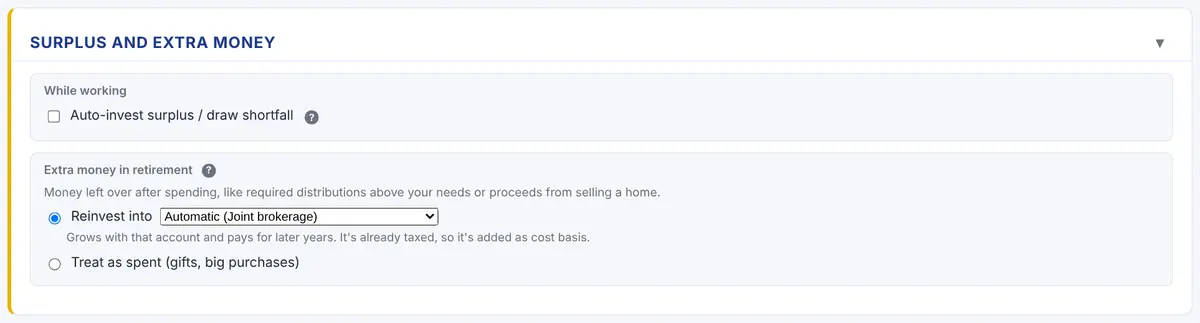
While working
| Setting | What it does | Default |
|---|---|---|
| Auto-invest surplus / draw shortfall | Each working year's surplus is deposited into the chosen account, and a shortfall is drawn from it instead. | Off |
| Destination account | The account that receives the money. Any account in the plan can be picked. | Select an account… |
To turn it on:
- Tick Auto-invest surplus / draw shortfall.
- Pick a Destination account.
- Look at the Auto-Invest column in the Year-by-Year Projection: it shows the amount moved each year. The destination account's balance in Account Balances includes these deposits.
The saved balance is part of your plan, so withdrawals in later years can spend it.
Extra money in retirement
This covers years when nobody in the household earns a salary. Typical sources: required minimum distributions above your needs, an always-drawn withdrawal sequence, Custom strategies that draw too much, or the proceeds of selling a home.
| Choice | What happens | Default |
|---|---|---|
| Reinvest into | The money goes into a brokerage or savings account, grows with it and pays for later years. | Yes |
| Treat as spent (gifts, big purchases) | The money leaves the plan in the year it arrives. Your portfolio won't include it. | — |
The list next to Reinvest into offers your brokerage and savings accounts. Retirement accounts can't take reinvested money, because they have contribution limits. Automatic (…) picks, in order:
- your auto-invest account, if it is a brokerage or savings account;
- otherwise your first brokerage account;
- otherwise your first savings account.
If there is no brokerage or savings account, the card warns that the money is treated as spent. Add one, or pick an account.
Cost basis, in plain words
Money that is reinvested or auto-invested was already taxed. The app remembers that amount, called the cost basis, so it isn't taxed a second time:
- Reinvested money is added to the account's cost basis.
- When you later withdraw from that account, the cost-basis part comes back tax-free.
- Only the growth on top of it is taxed, by that account's normal rules (for example capital gains in a brokerage account).
For a brokerage account, also enter its starting Cost basis ($) in Investments & Accounts; otherwise the whole withdrawal is taxed as ordinary income.
Example: the Rivera family
The Riveras use the defaults: Auto-invest surplus / draw shortfall is off, and Extra money in retirement is set to Reinvest into Automatic (Joint brokerage).
Two kinds of years can bring extra money:
| When | Source | What the card does |
|---|---|---|
| Alex 75 | The family home ($725,000 today, growing 3% a year, cost basis $310,000) is sold to downsize. | After selling costs and any tax, the proceeds go into Joint brokerage and pay for later years. |
| Alex 75 on, Sam 75 on | RMDs start for both (born 1960 or later). If an RMD is larger than the year's need, the rest is extra money. | The extra goes into Joint brokerage as well. |
To see the difference:
- Choose Treat as spent (gifts, big purchases).
- Compare Total Portfolio in the last years of the projection. It is lower, because the sale proceeds left the plan.
- Switch back to Reinvest into if you plan to keep the money.
Good to know
- Under Optimal, normal years have no surplus — the plan draws exactly what you need. Extra money mostly comes from RMDs, always-drawn sequences and asset sales.
- Converting traditional money to Roth before RMD age can make later RMDs smaller. See Roth conversions.
- Turning auto-invest off stops routing in the next projection.