You and your spouse
Tell the app who the plan is for: birth dates, when each of you stops working, and how long the plan should last. Everything else in the plan is measured against these ages.
Where to find it
The Age card is the first card in the plan. Click ↓ Age in the header to jump to it. Click the card's title or the ▼ arrow to fold it away or open it again. The app remembers whether it is open.
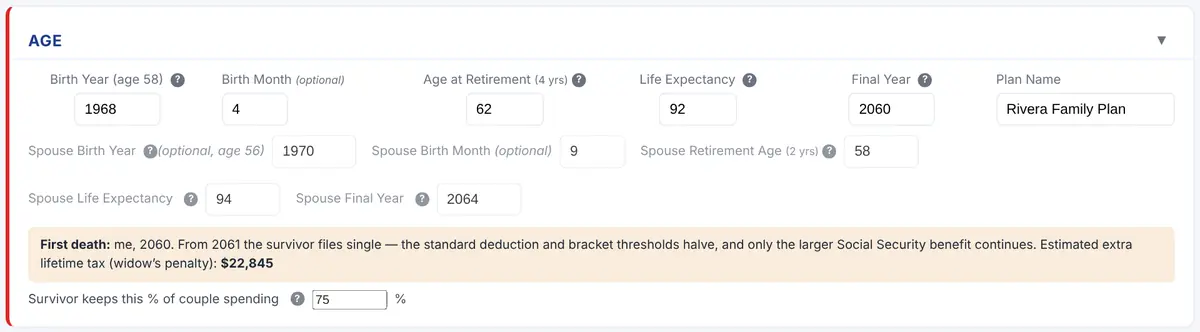
Fill in your details
- Type your Birth Year. The app shows your age next to the label, for example "(age 58)".
- Type your Birth Month as a number from 1 to 12. It is optional, but it makes the plan more precise. See Why birth month matters.
- Type your Age at Retirement. The label shows how many years are left, for example "(4 yrs)".
- Type your Life Expectancy, or the Final Year of the plan. Change either one and the other updates.
- Give the plan a Plan Name. This is the name you see in the plan list and on the Home page.
The app saves each change on its own a moment after you type. The header shows Saving… and then Saved.
| Field | What it means | Default |
|---|---|---|
| Birth Year | The year you were born. Sets your age today. | — |
| Birth Month | 1 = January … 12 = December. Optional. | blank |
| Age at Retirement | The age your plan switches from working years to retirement years. | 65 |
| Life Expectancy | The age your plan runs to. | 90 |
| Final Year | The same thing as a calendar year (birth year + life expectancy). | — |
| Plan Name | The plan's name. | My Retirement Plan |
What "Age at Retirement" does
Your retirement age decides three things:
- When your accounts start paying out, unless you gave an account its own Withdrawal Start Age (see Investments and accounts).
- When salary and contributions stop for any job without an End Age (see Income).
- Where the projection marks the start of retirement.
It does not decide when Social Security starts. You set that on the Social Security card. See Social Security.
Tip: If you have already stopped working, enter your current age as your retirement age.
How long should the plan last?
Social Security uses about 85 as an average. Many planners use 90 to 95, so you don't run out of money if you live longer than average. Running the plan longer is the safer choice.
Add your spouse
The second row of the card is for a spouse or partner. Leave it blank for a single plan.
| Field | What it means |
|---|---|
| Spouse Birth Year | Your spouse's birth year. The app shows their age. |
| Spouse Birth Month | Optional, 1–12. |
| Spouse Retirement Age | When your spouse's jobs stop and their accounts start paying out. |
| Spouse Life Expectancy | How long your spouse's part of the plan runs. Default 90. |
| Spouse Final Year | The same as a calendar year. |
Each person's jobs, accounts, Social Security and pension follow their own ages.
Note: Filing status (single, married filing jointly, head of household) is set on the Inflation & Income Tax card. See Inflation and taxes.
Why birth month matters
Without a birth month, the app assumes your birthday has already happened this year. For someone born late in the year, that can make you one year "older" in the plan than you are. Age-based events — Social Security, a pension, the sale of a home — can then show up a year early.
With a birth month, the app also counts only the months you are paid in the first year of Social Security. If you start at your birthday, you get payments from your birth month through December.
| Born in | Months of Social Security in the first year |
|---|---|
| January | 12 |
| April | 9 |
| September | 4 |
| December | 1 |
After the first year, you get a full year.
If you type a month outside 1–12, the field turns red and says Enter a month from 1 to 12. The app doesn't use it until it is fixed or cleared.
Note: If you see Please check the birth year(s) below. Earlier versions could shift a birth year by one year., check both birth years. Click Looks right when they are correct, or fix them.
The "No paycheck" note
Sometimes there are years before your retirement age with no job. The app then shows a gray note with a blue ℹ:
No paycheck from age 58 to 62 — those years are paid only from your savings and accounts. If you have already stopped working, use 58.
This is a note, not a warning. A gap before retirement is often planned. It only appears after you have entered something about that person's money (a job, an account, Social Security, or an income line), so a new plan stays quiet.
- Set to 58 (the button shows the first age of the gap) changes the retirement age to that age. Use it if you have already stopped working.
- ✕ hides the note for this plan and this person. If the ages of the gap change later, the note comes back.
A job with no End Age runs to the retirement age, so it never leaves a gap. For you (not your spouse), an income line in Other Income that covers those years also counts as a paycheck.

When one of you dies first: the survivor note
In a married plan filing jointly, with both birth years filled in, the card shows a survivor note. The plan assumes the first death happens at the earlier of the two final years.
The note says who dies first and when, and that from the next year the survivor files single — the standard deduction and bracket thresholds halve, and only the larger Social Security benefit continues.
When the app can work it out, the note also shows Estimated extra lifetime tax (widow's penalty). This is the extra federal tax the survivor pays because single tax brackets are narrower than joint ones, while much of the income stays the same.
Survivor keeps this % of couple spending sets how much of the couple's spending the survivor still needs. The default is 75%. Set 100% for no change. Healthcare is handled on its own: the person who died stops having healthcare costs.

Example: the Rivera family
| Field | Alex | Sam |
|---|---|---|
| Birth year / month | 1968 / 4 (April) | 1970 / 9 (September) |
| Retirement age | 62 | 58 |
| Life expectancy | 92 | 94 |
- Plan Name: Rivera Family Plan. They file Married Filing Jointly.
- Alex's final year is 1968 + 92 = 2060. Sam's is 1970 + 94 = 2064. Alex's comes first, so the survivor note names Alex, and Sam files single from 2061.
- Both of them claim Social Security at 67. Because Alex was born in April, Alex's first Social Security year has 9 months of payments. Sam, born in September, gets 4 months in the first year.
- Sam's job at Lakeview School District ends at 58, which is also Sam's retirement age, so there is no "No paycheck" note.
Good to know
- Your retirement age must be later than your age today, and your life expectancy later than your retirement age. The app won't save ages that break these rules.
- Changing a birth year can move every age-based event in the plan. Check the projection afterwards.
- The plan follows each person to their own life expectancy. The last row of the projection is the later of the two final years.
See also
- Inflation and taxes — filing status and tax settings
- Social Security — claiming age and survivor benefits
- Income — jobs and their end ages
- Year-by-year projection
- Glossary