Expenses
List what you spend: housing, food, travel, gifts and anything else. The plan compares your spending with your income every year and shows a surplus or a shortfall.
Where to find it
The Expenses card is below the Withdrawals card. Click ↓ Expenses in the header to jump to it. Click the title or the ▼ arrow to fold it.
At the top of the card:
| Button | What it does |
|---|---|
| + Add from Library | Opens a list of common expenses to pick from |
| + Add Expense | Adds an empty row |
| Clear All | Removes every row, after you confirm ("Remove all expense rows? This can't be undone.") |
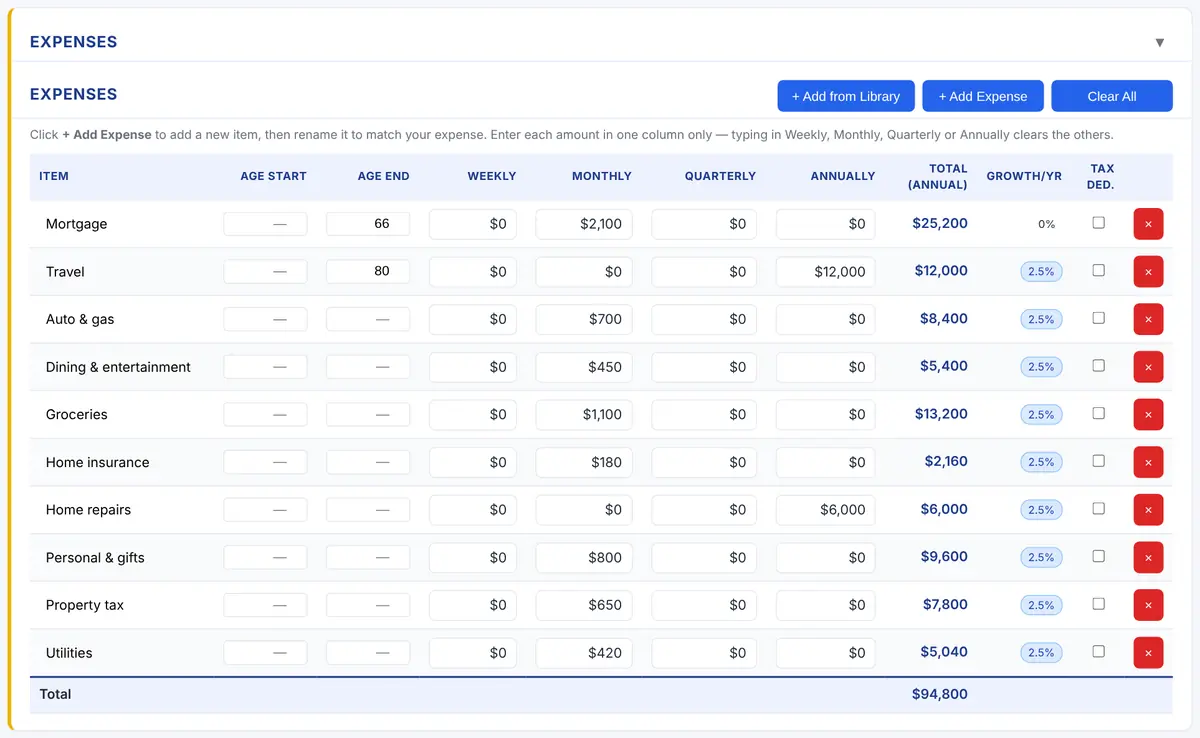
Add an expense
- Click + Add Expense.
- Type a name in Item, for example "Groceries".
- Type the amount in one column: Weekly, Monthly, Quarterly or Annually. Typing in one column clears the others.
- Optional: set Age Start and Age End.
- Optional: change Growth/yr.
- Optional: tick Tax Ded. if the expense is tax-deductible.
The app saves your changes on its own. Total (Annual) shows each row's yearly amount, and the Total line at the bottom adds them up. Click × to remove a row.
| Column | What it means |
|---|---|
| Item | A name for the expense |
| Age Start | The age the expense begins. Blank = this year. |
| Age End | The last age you pay it. Blank = through your life expectancy. |
| Weekly / Monthly / Quarterly / Annually | The amount, in one column only. Weekly counts 52 times a year, monthly 12, quarterly 4. |
| Total (Annual) | The yearly amount |
| Growth/yr | How fast the amount grows each year |
| Tax Ded. | Tick if the expense is tax-deductible |
Ages are your ages (the first person in the plan).
How expenses grow
The Growth/yr badge shows how each row grows:
| Badge | Meaning |
|---|---|
| The plan rate, for example 2.5% | The row follows the plan's inflation rate. Change that rate on the Inflation & Income Tax card. |
| 0% | The amount never changes. Good for a fixed-rate mortgage or a loan. |
| Another rate | The row grows at that rate. |
To change it, click the badge, type a rate and click Done. Click plan % to go back to the plan rate.
Growth starts at the row's Age Start. For a row with a later start age, type what you expect to pay in that first year.
Tip: Medical costs usually rise faster than other prices. Many planners use 5% to 7% a year for them. If the Healthcare section is on, it already models premiums and medical costs with their own growth rate — see Healthcare.
Tax-deductible expenses
A ticked Tax Ded. row counts as an itemized deduction: for example mortgage interest, property tax, charitable gifts or medical costs. Medical costs count only above 7.5% of income, and state and local taxes are capped, as on a real tax return. Itemized deductions lower your tax only when, together, they are larger than your standard deduction.
Add from the Expense Library
The library is a list of common retirement expenses with typical amounts, start and end ages, and growth rates.
- Click + Add from Library. The Add expenses from library window opens.
- Tick the expenses that apply to you. Select All and Deselect All help with long lists.
- Change any amount in its box. The unit is shown next to it: /mo or /yr.
- Click Add selected. The count next to it shows how many you picked.
The rows are added to your table. You can edit them like any other row.
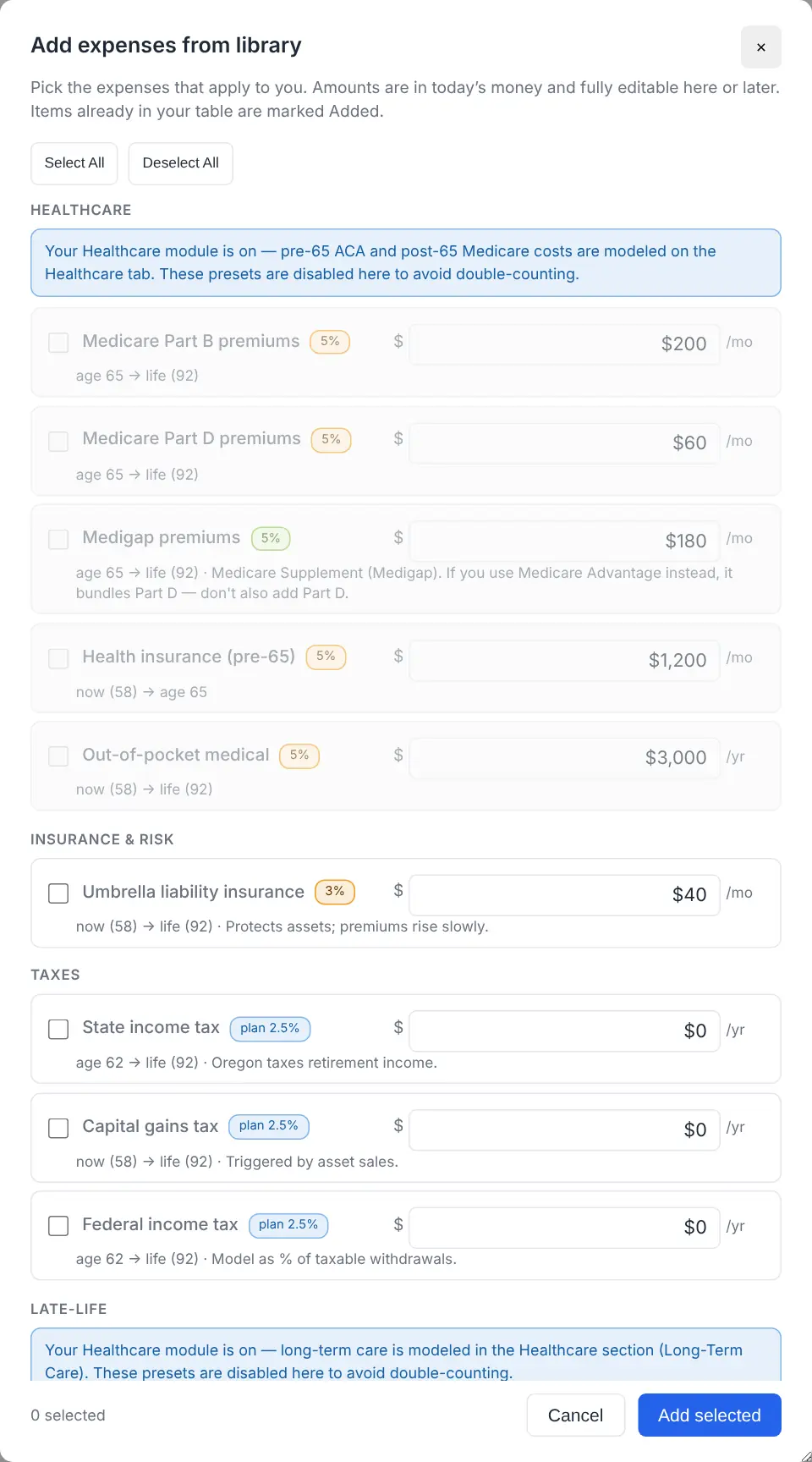
What the library shows
The expenses are grouped:
- Pre-retirement obligations — mortgage or rent, property taxes, auto loan, college
- Core retirement living — groceries, utilities, travel, hobbies, gifts
- Healthcare — premiums and out-of-pocket medical costs
- Insurance & risk — for example umbrella insurance
- Taxes
- Late-life — in-home care, assisted living, memory care
- One-time / lumpy — a new roof, a car, a wedding
Each item shows:
- A growth badge: plan 2.5% (follows the plan rate), 0% fixed, or its own rate such as 5%.
- When it runs, for example "now (58) → life (92)", "age 75 · one-time", or "age 82 → age 85".
- Added if a row with the same name is already in your table, so you don't add it twice. You can still add it again; the copy gets a number, for example "Travel 2".
Why some items are grayed out
When the Healthcare section is on, it already models these costs. The library turns them off so they aren't counted twice, and the group says why:
| Group | Grayed-out items | Note in the group |
|---|---|---|
| Healthcare | Health insurance (pre-65), out-of-pocket medical, Medicare Part B, Part D and Medigap premiums | Pre-65 ACA and post-65 Medicare costs are modeled on the Healthcare tab. |
| Late-life | In-home care, assisted living, memory care | Long-term care is modeled in the Healthcare section (Long-Term Care). |
To add them here instead, turn the Healthcare section off. See Healthcare and Long-term care.
Example: the Rivera family
| Item | Amount | Age End | Growth/yr |
|---|---|---|---|
| Mortgage | $2,100 monthly | 66 | 0% |
| Property tax | $650 monthly | — | plan |
| Home insurance | $180 monthly | — | plan |
| Groceries | $1,100 monthly | — | plan |
| Utilities | $420 monthly | — | plan |
| Auto & gas | $700 monthly | — | plan |
| Personal & gifts | $800 monthly | — | plan |
| Travel | $12,000 annually | 80 | plan |
| Dining & entertainment | $450 monthly | — | plan |
| Home repairs | $6,000 annually | — | plan |
- The mortgage has a fixed payment, so its Growth/yr is 0%. It ends at 66 (Alex's age), when the loan is paid off. From 67 it is gone from the plan.
- Travel ends at 80: they expect to travel less after that.
- All other rows grow with the plan's 2.5% inflation rate.
- The Riveras' healthcare is in the Healthcare section, so the library's healthcare and late-life items are grayed out for them.
Good to know
- Expenses are in the plan's first-person ages. In a married plan, after the first death the survivor keeps a share of these expenses — 75% by default. See You and your spouse.
- Costs of a sellable asset, such as a home's upkeep until it is sold, can go in its Annual Carrying Cost ($) instead. See Pensions and assets.
- If a year's expenses are more than its income, the projection shows a shortfall. See Shortfalls.