Healthcare
Estimate what health insurance and medical care will cost you each year: insurance before 65, Medicare from 65, and help for the income limits that can raise those costs. The app adds these costs to your plan's expenses.
Note: Healthcare figures are planning estimates, not insurance, tax or Medicare advice. Check real prices on healthcare.gov and medicare.gov before you decide.
Where to find it
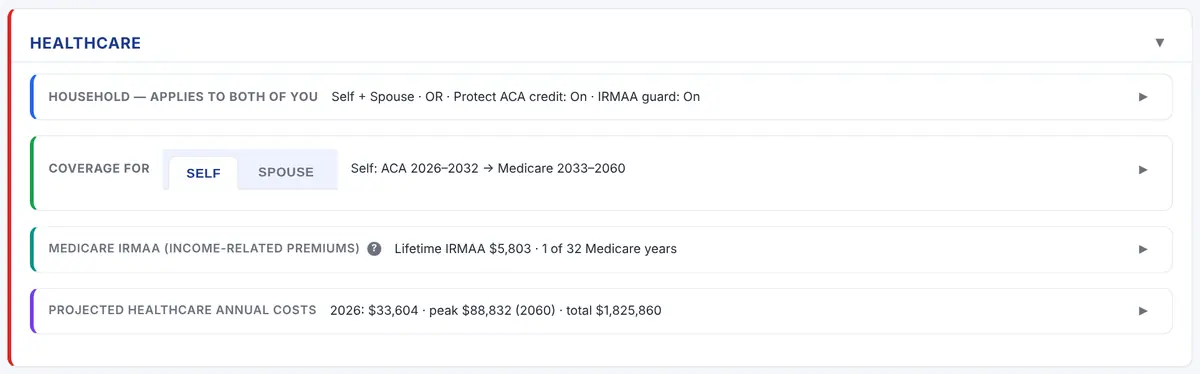
Click ↓ Healthcare in the navigation bar at the top of the plan. The Healthcare card has four regions:
| Region | What it holds | Per person or household |
|---|---|---|
| Household — applies to both of you (Household in a one-person plan) | Who is included, household size, state, premium growth, and the income-cliff guards | Household |
| Coverage for · Self / Spouse | Insurance before 65, Medicare, enrollment details and long-term care for the person whose tab is open | Per person |
| Medicare IRMAA (income-related premiums) | Extra Medicare premiums for higher incomes. See Medicare IRMAA | Household |
| Projected Healthcare Annual Costs | Year-by-year results | Read-only |
Folding. Click a region's header, or its ▼ button, to fold it to a one-line summary. Click again to open it. The app remembers which regions you folded on this computer. The IRMAA region starts folded. A folded region keeps working: its fields still save and its results still update.
Choose who is included
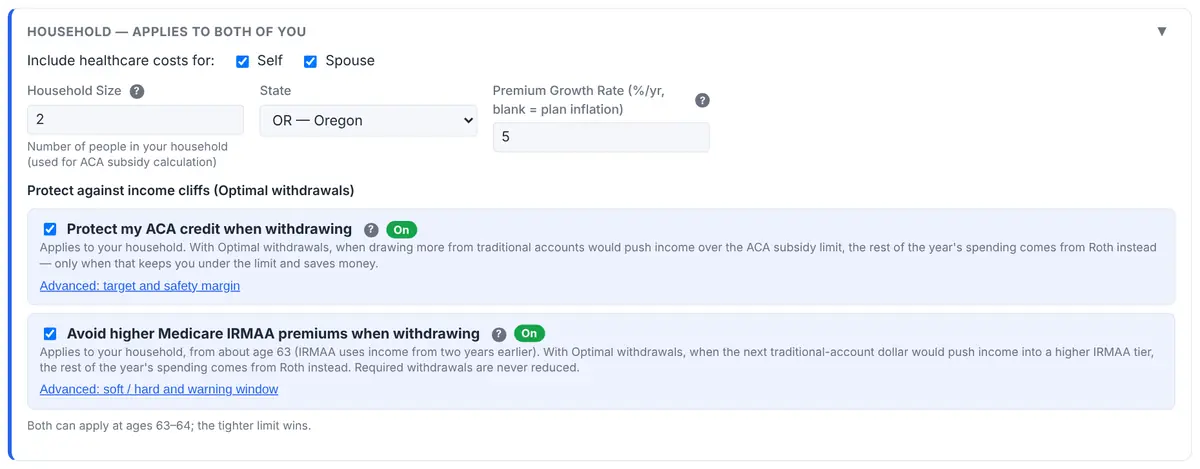
- In the Household card, next to Include healthcare costs for:, tick Self, Spouse or both. In a one-person plan, tick Enable healthcare cost projection.
- Set Household Size: the number of people on your tax return. The app uses it for ACA help (see below).
- Pick your State. It sets average out-of-pocket costs, the long-term-care daily rate and Medicaid rules. It applies to both people. — None — uses national averages.
- Optional: enter Premium Growth Rate (%/yr, blank = plan inflation). Health costs often grow faster than general prices. Leave it blank to use your plan's inflation rate. Enter 0–20.
Each Household control saves as soon as you change it.
A person who is not included adds no healthcare costs at all. Their tab reads Spouse (not included) and shows an Include Spouse button. Their saved choices are kept for later.
Tip: If healthcare is on for you but not your spouse, Plan Alerts shows Spouse's Healthcare Not Included. Turn your spouse on, or ignore the alert if those costs are budgeted somewhere else.
Insurance before 65
Open the person's tab in Coverage for. The Pre-65 Coverage (Bridge) box is on by default. Untick it if this person's coverage is paid somewhere else, for example from a paycheck.
Choose a Coverage Mode:
| Mode | What you enter | What the app does |
|---|---|---|
| ACA Marketplace | SLCSP Annual Premium ($) (optional) | Prices a marketplace plan for each age, and subtracts any premium tax credit you qualify for |
| COBRA Continuation | COBRA Monthly Premium ($) and COBRA Months Remaining (0–36) | Charges COBRA until the months run out, then switches to the ACA marketplace |
| Manual / Other | Annual Premium ($) and, optionally, Annual Out-of-Pocket ($) | Uses your numbers, grown each year. No tax credit |
Health Status (Excellent, Good, Fair, Poor) sets the yearly out-of-pocket estimate: deductibles, copays and coinsurance. It does not change the premium. The default is Good.
ACA marketplace and the 400% cliff
The SLCSP is the benchmark plan: your county's second-lowest-cost silver plan. Look it up on healthcare.gov and enter its yearly premium. If you leave it blank, the app estimates it from a national average adjusted for age. Plan Alerts then shows ACA Premium Is an Estimate.
The premium tax credit (the "ACA credit") lowers the premium when your income is low enough. Put simply:
- The lower your income, the smaller the share of income you are expected to pay. The credit covers the rest of the benchmark premium.
- Income here means ACA MAGI: your adjusted gross income plus tax-exempt interest and all of your Social Security.
- At 400% of the federal poverty line the credit stops completely. One dollar over the line can cost you the whole credit, often thousands of dollars a year. This is the "subsidy cliff".
- Each year uses its own poverty line, grown with your plan's inflation.
- In a Medicaid-expansion state, very low income (at or below 138% of the poverty line) is treated as Medicaid: no premium. Plan Alerts shows Medicaid Assumed.
Employer coverage until a set age
If a job or retiree plan covers you until a certain age:
- Click ▸ Medicare enrollment, drug coverage and penalties to open it.
- Set Group coverage after 65 to Current job (mine or spouse's) or Retiree plan.
- Enter Group coverage until age.
While covered, the app charges no premium (it assumes the premium comes out of pay) but still counts out-of-pocket costs. Coverage ends in your birthday month in the year you reach that age. If you leave the age blank, the app ignores the coverage and Plan Alerts shows Group Coverage Has No End Age.
Medicare from 65
The Medicare (65+) box is on by default. Medicare starts in the month of your 65th birthday, using Birth Month from the Age section (January if blank). In that year the cost is split between pre-65 coverage and Medicare months.
| Field | What it is | If left blank |
|---|---|---|
| Part B | The standard Medicare premium, from the official tables. Not an input | — |
| Part D Monthly Premium ($) | Your drug plan premium | $60 a month |
| Use Medicare Advantage instead of Medigap | Switch between the two kinds of coverage | Medigap |
| Medigap Supplement Monthly ($) | A plan that fills gaps in Original Medicare | $180 a month |
| Medicare Advantage Monthly ($) | An all-in-one private plan. Part B is still charged | $0 a month |
| Dental & Vision Monthly ($) | Dental and vision premiums | $50 a month |
Amounts are in today's dollars and grow with the premium growth rate. Type 0 if you truly pay nothing; a blank field uses the default. Out-of-pocket costs after 65 come from your Health Status and state.
All costs stop after the person's life expectancy. In a couple, the survivor's costs continue.
Enrollment, delayed Part B and penalties
The ▸ Medicare enrollment, drug coverage and penalties section is closed by default. Its defaults mean "sign up for Parts A, B and D at 65". Open it only for special cases:
- Medicare because of: Age 65, or an earlier start because of disability, kidney failure (ESRD) or ALS. An early start shows a start age and Medicare start month. That year's row in the results reads Medicare starts.
- Part B start age: delay Part B. This is penalty-free only with Current job (mine or spouse's) coverage. Otherwise Medicare adds a lifetime penalty of 10% of the Part B premium for each full year of delay. If the delay leaves you without coverage, Plan Alerts shows No Coverage While Part B Is Delayed.
- Drug coverage: Part D, Medicare Advantage with drugs, an employer plan, VA, TRICARE For Life, or none. A gap in drug coverage adds a Part D penalty.
- Past months without Part B (penalty) / Past months without drug coverage (penalty): months from a penalty letter you already received.
Penalties show in Plan Alerts (Part B late-enrollment penalty, Part D late-enrollment penalty) and in the IRMAA region's Late-enrollment penalties tile.
Copy one person's choices
At the bottom of the Coverage for frame, Copy plan choices from Spouse (or from Self) copies coverage type, health status, Medicare plan and drug coverage, dental/vision and long-term-care choices. Ages, a benchmark or COBRA quote and enrollment details are not copied.
The form saves by itself a moment after each change (Changes save automatically.). 💾 Save settings (Self) saves at once.
Protect against income cliffs
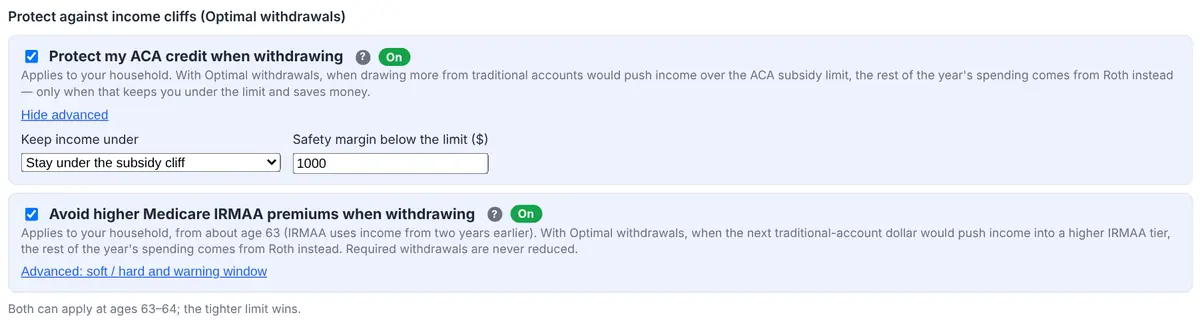
The Household card has a group called Protect against income cliffs (Optimal withdrawals). Both guards work only when your withdrawal method is Optimal (see Withdrawals). They change which account pays for a year's spending, never how much you spend.
The ACA guard
Protect my ACA credit when withdrawing appears when someone included uses the ACA or COBRA and is under 65. It is on by default for new plans.
What it does: money from traditional (pre-tax) accounts counts as income; Roth withdrawals do not. When the next traditional dollar would push household income over the ACA limit, the guard pays the rest of the year's spending from Roth instead. It acts only when:
- there is enough Roth money to stay under the limit, and
- the health-cost saving is bigger than what it costs (for example, a 10% penalty on Roth drawn before 59½).
It never reduces required withdrawals and never creates a shortfall. Advanced: target and safety margin offers Stay under the subsidy cliff (the default) or Stay under a target % of the poverty line, and a Safety margin below the limit ($) (default $1,000).
When the guard is off and could help, the app says what it would keep ("Turning it on would keep about … of premium credit…"), shows a Turn on Protect ACA credit banner above the results, an orange A! in the projection's MAGI column, and a Protect Your ACA Credit alert. When it acts, you see a blue A and the alert ACA Credit Protected.
The IRMAA guard
Avoid higher Medicare IRMAA premiums when withdrawing appears when someone included reaches Medicare in the plan. It works the same way for IRMAA tiers, from about age 63, because Medicare looks at income from two years earlier. Advanced: soft / hard and warning window offers Soft — prefer Roth/HSA before crossing a tier, Hard — also cap Roth conversions at the tier, and Warn when MAGI is within ($). See Medicare IRMAA.
At ages 63–64 both guards can apply. The tighter limit wins.
Tip: A guard decides one year at a time. Spending Roth now gives up future tax-free growth. To judge the trade, clone the plan, turn the guard off in the copy, and compare the two in Compare plans.
Read the results
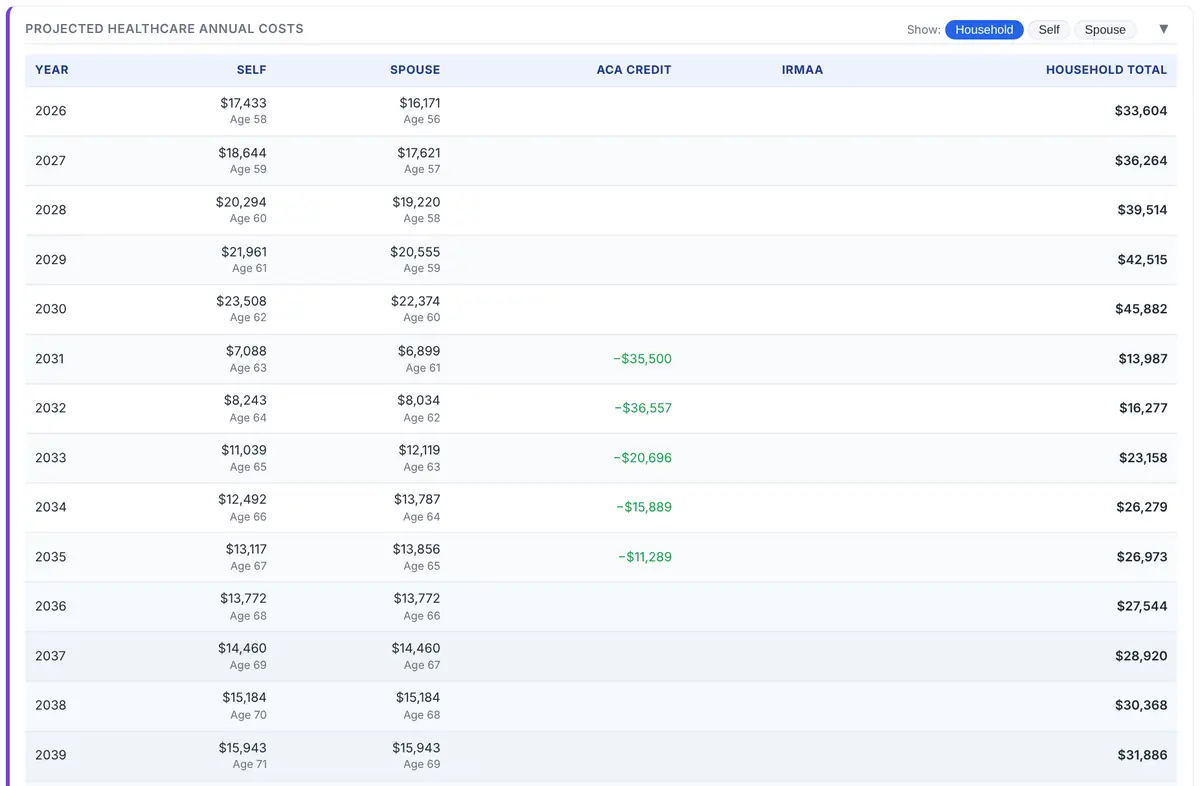
Projected Healthcare Annual Costs shows one row per year, in future dollars. Couples choose what it shows with Show: Household, Self or Spouse. Clicking a person's tab in Coverage for also switches the results to that person.
Household view:
| Column | Shows |
|---|---|
| Year | Calendar year |
| Self · Spouse | That person's total cost for the year, with their age |
| ACA credit | Both people's premium tax credits, in green |
| IRMAA | Both people's Medicare surcharges |
| Household total | Self + Spouse |
One person's view:
| Column | Shows |
|---|---|
| Age · Phase | The person's age, and Pre-65, Turns 65 or Medicare |
| Premium | Premium paid, after any ACA credit |
| Subsidy | The ACA credit, in green |
| OOP | Out-of-pocket estimate |
| LTC | Long-term care (see Long-term care) |
| IRMAA | The IRMAA tier billed that year |
| Total | Premium + OOP + LTC |
Hover over any cell for how the number was built. The Total tooltip also shows the amount in today's dollars. Results update by themselves after any change to the plan.
Where healthcare shows up elsewhere
| Place | What you see |
|---|---|
| Year-by-year projection | Healthcare is part of Total Expenses (hover for a per-person breakdown). The MAGI column shows the income that sets IRMAA two years later, with the A / A! ACA marks. An IRMAA column appears once any year has a surcharge |
| Plan Alerts | ACA, COBRA, Medicaid, Medicare, penalty and IRMAA alerts. Go to setting jumps to the field |
| Withdrawals | A status line such as "Income cliffs: Protect ACA credit: On · IRMAA guard: On · change in Healthcare" |
| Expenses | In + Add from Library, healthcare and long-term-care presets are disabled while Healthcare is on, so costs are not counted twice |
| Roth conversions | IRMAA and ACA limits on Fill to bracket conversions |
Example: Sam bridges to Medicare
In the Rivera Family Plan, Sam retires from Lakeview School District at 58, in 2028. Sam turns 65 in September 2035. That leaves about seven years to cover before Medicare.
- Open Coverage for · Spouse (Sam).
- Keep Pre-65 Coverage (Bridge) on and Coverage Mode = ACA Marketplace. The Riveras left the benchmark blank, so the app estimates it.
- To model the school district's plan while Sam still works, open ▸ Medicare enrollment, drug coverage and penalties. Set Group coverage after 65 to Current job (mine or spouse's) and Group coverage until age to 58.
- Keep Medicare (65+) on with Part D $45, Medigap $210 and dental/vision $40 a month.
- In Projected Healthcare Annual Costs, click Spouse. Check the Phase and Subsidy columns for 2028–2035.
While Alex still earns a salary (to age 62, in 2030), household income is likely over the ACA cliff, so expect little or no credit. After Alex retires, income depends on withdrawals, and that is where the ACA guard can help.
Example: the ACA guard
The Riveras use Optimal withdrawals, and their ACA guard is on with Stay under the subsidy cliff.
- Scroll to the Year-by-year projection. Look for a blue A in the MAGI column in Sam's marketplace years. Hover over it to see how much was drawn from Roth and the credit kept.
- Open Plan Alerts and look for ACA Credit Protected.
- To see the lifetime effect, clone the plan, untick Protect my ACA credit when withdrawing in the copy, and compare the two plans. In the copy, hover over any A! to see how far income is over the limit.
Good to know
- Health savings account (HSA) withdrawals are tax-free only up to the year's qualified medical costs.
- Household size counts at least 2 in years you file jointly, and one less after a spouse's death.