Inflation and taxes
Set how fast prices rise, how you file your taxes, your state, and the tax and IRS-limit figures the plan uses. These settings belong to this plan only.
Important: Taxes in the app are planning estimates, not tax advice. The app uses simplified federal and state rules to show how taxes change your plan over time. For your actual return, talk to a tax professional or see irs.gov.
Where to find it
| Setting | Where |
|---|---|
| Inflation rate, filing status, state income tax | The Inflation & Income Tax card (header link ↓ Inflation & Tax) |
| Tax year, standard deductions, capital gains | Income card → ⚙ Settings → Tax Settings tab |
| IRS contribution limits | Income card → ⚙ Settings → IRS Limits tab |
The Inflation & Income Tax card starts folded. Click its title or the ▼ arrow to open it.
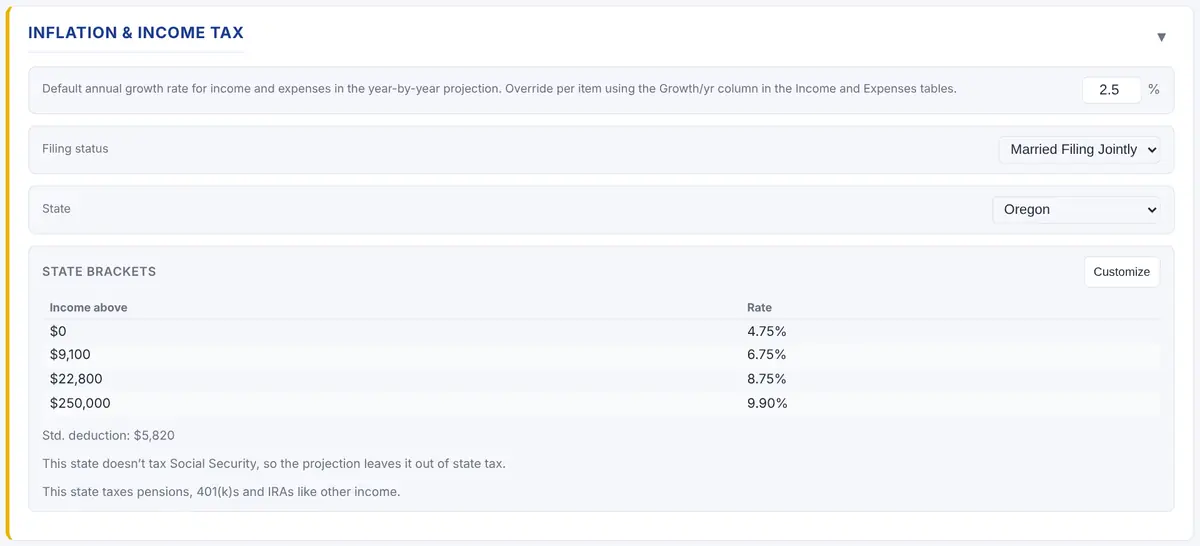
Set the inflation rate
The first box on the card is the plan's inflation rate. The default is 2.5% a year.
Every income and expense row whose Growth/yr follows the plan grows at this rate each year. Change the rate and all of those rows change with it.
| A row's Growth/yr shows | What happens |
|---|---|
| The plan rate, for example 2.5% | The row follows the plan's inflation rate. |
| 0% | The row stays the same every year (for example, a fixed mortgage payment). |
| Any other rate | The row grows at that rate and ignores the plan rate. |
To set a row's own rate, click its Growth/yr badge in the Income or Expenses table, type the rate and click Done. Click plan % to go back to the plan rate. See Expenses.
Some things use their own growth rate, not the plan rate:
- Salary grows by the job's Annual Raise (%).
- A pension grows by its COLA (%/yr).
- Healthcare premiums grow by their own premium growth rate (see Healthcare).
Choose your filing status
Filing status applies to both federal and state tax:
- Single
- Married Filing Jointly
- Head of Household
When you change it, the app reloads the state brackets for that status at once.
In a married plan, the survivor files Single from the year after the first death. See You and your spouse.
State income tax
- Pick your state in State. Choose — None — if you don't want state tax in the plan.
- If your state has no income tax, the card says so, for example "Texas has no state income tax."
- Otherwise the card shows State Brackets: each Income above amount and its Rate, and the state's Std. deduction if it has one.
- Under the brackets the card says how the state treats Social Security. Most states don't tax it: "This state doesn't tax Social Security, so the projection leaves it out of state tax." A few states tax part of it; the projection then taxes it as the federal return does and doesn't model that state's own exclusions.
- Next the card lists the retirement income the state doesn't tax, for example all pensions, 401(k), 403(b), 457(b) and IRA withdrawals and Roth conversions in Illinois, or up to $20,000 a person from age 60 in New York. The projection leaves that income out of state tax, using each person's age and the household's income each year. If the state has no such break, the card says "This state taxes pensions, 401(k)s and IRAs like other income."
The projection uses these brackets as soon as you pick the state; you don't need to customize anything. Point at a year's Est. Tax to see the state's share. The tooltip also shows how much retirement income the state left out that year.
What isn't modeled: breaks only for government or military pensions, a state's own partial Social Security exclusions, extra credits for retirees, and a few fine details (such as New Jersey's partial exclusion just above its income limit). These rules use 2026 tax law.
Change the brackets
- Click Customize. The table becomes Custom Brackets and you can edit it.
- Change an amount or rate, add a row with + Add bracket, or change Std. deduction ($).
- Click Save. The table now says (customized).
Reset puts back the state's own brackets for the current filing status. Cancel leaves without saving.
Your custom brackets are kept per filing status and per state. If you switch to another state and back, your custom brackets for the first state come back.
Apply to all my plans
If you have more than one plan, Apply to all my plans… appears next to State. It asks: "Copy this state, its rate and any custom brackets to your other plan(s)?" Click Yes, apply to copy them, or Cancel.
Tax settings for this plan
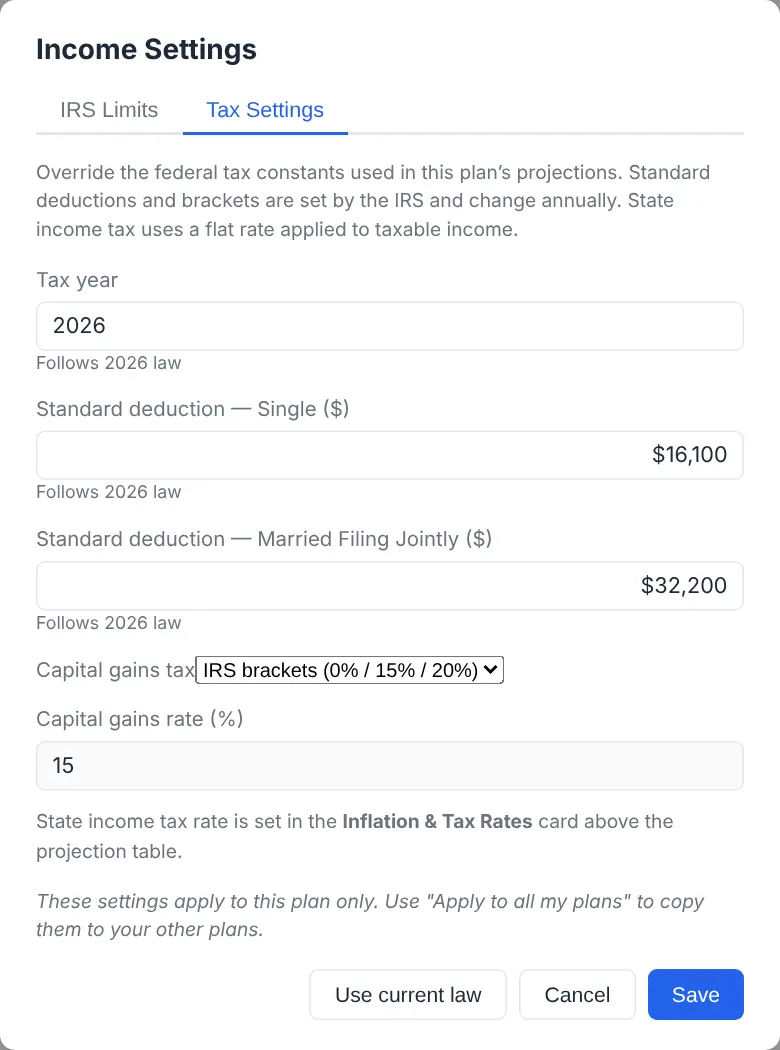
Open Income → ⚙ Settings and pick the Tax Settings tab.
| Field | What it means | Default |
|---|---|---|
| Tax year | The year of the tax law the plan starts from. | 2026 |
| Standard deduction — Single ($) | Subtracted from income before tax for single filers. | $16,100 |
| Standard deduction — Married Filing Jointly ($) | The same for joint filers. | $32,200 |
| Capital gains tax | IRS brackets (0% / 15% / 20%) or Flat rate (below) | IRS brackets |
| Capital gains rate (%) | Used only with Flat rate (below). | 15% |
Follows 2026 law or Custom
Under each law figure you see one of two badges:
- Follows 2026 law — the plan uses the current figure and will update when the law changes in a later version of the app.
- Custom · 2026 law: $32,200 — you typed your own figure. The badge shows the current law next to it. Click Use current law to go back.
The Use current law button at the bottom of the dialog does this for every law figure on the open tab. Click Save to keep your changes, or Cancel.
The dialog says: "These settings apply to this plan only." With more than one plan, Apply to all my plans… copies this plan's tax and IRS-limit settings to your other plans after you click Yes, apply.
Tip: Want to compare two states or two sets of assumptions? Clone the plan and change the settings in the copy. Each plan keeps its own.
IRS contribution limits
The IRS Limits tab holds the yearly caps on what you can put into workplace plans. They apply when a job has Enforce IRS Contribution Limits? set to Yes (recommended) (see Income).
| Field | What it means | 2026 law |
|---|---|---|
| Employee contribution limit ($/yr) | Most you can put into a 401(k), 403(b) or similar plan | $24,500 |
| Catch-up age | Age from which you may add the catch-up amount | 50 |
| Catch-up amount ($/yr) | Extra you may add from the catch-up age | $8,000 |
| Self-employed limit ($/yr) | Total limit for self-employed plans such as a SEP IRA | $72,000 |
Each figure has the same Follows 2026 law or Custom badge.
How the app estimates federal tax
For each year of the plan, the app:
- Adds up your taxable income: salary, pension, withdrawals from traditional accounts, Roth conversions, the taxable part of Social Security, and taxable interest and dividends.
- Subtracts the standard deduction for that year's filing status. People 65 and older get the extra standard deduction for their age. If your tax-deductible expenses add up to more, the app uses those instead (see Expenses).
- Runs the rest through the federal tax brackets.
The brackets and standard deduction grow with the plan's inflation rate each year, the way the IRS adjusts them.
| Income | How it is taxed in the plan |
|---|---|
| Salary, bonus, pension | Ordinary income |
| Traditional 401(k), 403(b), IRA withdrawals | Ordinary income |
| Roth, HSA withdrawals | Tax-free |
| Gains on a brokerage account or a sold asset | Capital gains |
| Social Security | 0%, up to 50% or up to 85% taxable — see below |
How much Social Security is taxed
Social Security is never more than 85% taxable. How much is taxable depends on your combined income:
combined income = your other income + half of your Social Security
| Filing status | Up to this amount: 0% taxable | Between: up to 50% taxable | Above this amount: up to 85% taxable |
|---|---|---|---|
| Single, Head of Household | $25,000 | $25,000 – $34,000 | $34,000 |
| Married Filing Jointly | $32,000 | $32,000 – $44,000 | $44,000 |
These amounts are set by law and don't rise with inflation. That is why more of your Social Security tends to become taxable over the years. A Roth conversion or a large withdrawal can also push more of it into the taxable part.
Example: a single person has $30,000 of Social Security and $30,000 of other income. Combined income is $30,000 + $15,000 = $45,000, which is above $34,000, so up to 85% of the benefit can be taxed.
Example: the Rivera family
- Inflation: 2.5%.
- Filing status: Married Filing Jointly.
- They live in Oregon. To include Oregon's state tax, they pick Oregon in State.
- Their tax and IRS-limit settings show Follows 2026 law everywhere: they haven't typed their own figures.
- Their mortgage row has a Growth/yr of 0%, so it stays at $2,100 a month while other expenses grow at 2.5%.
Good to know
- When no state is chosen, the projection shows a reminder to pick one. You can dismiss it.
- Capital gains on your home sale can be partly excluded. See Pensions and assets.
- Healthcare costs, IRMAA and ACA help depend on your income too. See Healthcare and IRMAA.