Income
Enter the money that comes in: jobs, and any other income such as rent or consulting. Social Security, pensions, accounts and home sales have their own tabs and pages.
Where to find it
The Income card comes after Inflation & Income Tax. Click ↓ Income in the header to jump to it. It has six tabs:
| Tab | What goes there | Page |
|---|---|---|
| Employment | Jobs: salary, raises, bonus, employer match | this page |
| Investments & Accounts | 401(k), IRA, Roth, brokerage, savings, HSA | Investments and accounts |
| Social Security | Your SSA estimates and claiming age | Social Security |
| Pension | Monthly pension payments | Pensions and assets |
| Sellable Assets | A home, business or other asset you plan to sell | Pensions and assets |
| Other Income | Anything else: rent, consulting, royalties, alimony | this page |
The ⚙ Settings button on the right of the tabs opens the IRS limits and tax settings for this plan. See Inflation and taxes.

Employment
A job adds salary to your income and pays into any account linked to it. Add one card per job, for you and for your spouse. You can also add a future job, such as part-time work after you retire.
Add a job
- Open the Employment tab and click + Add Employment.
- A new card opens with the name selected. Type the Employer Name.
- Choose the Owner: Self or Spouse.
- Fill in Current Salary ($/yr) and Annual Raise (%).
- Leave Start Age blank for a job you have now. Leave End Age blank if the job runs to that person's retirement age.
- Click 💾 Save Employment, or just close the card. Changes to a saved job are saved on their own a moment after you type.
The card's header shows the owner, the salary and the ages it covers, for example age 58–62. A job that has already ended shows ended at 55 and adds no salary.
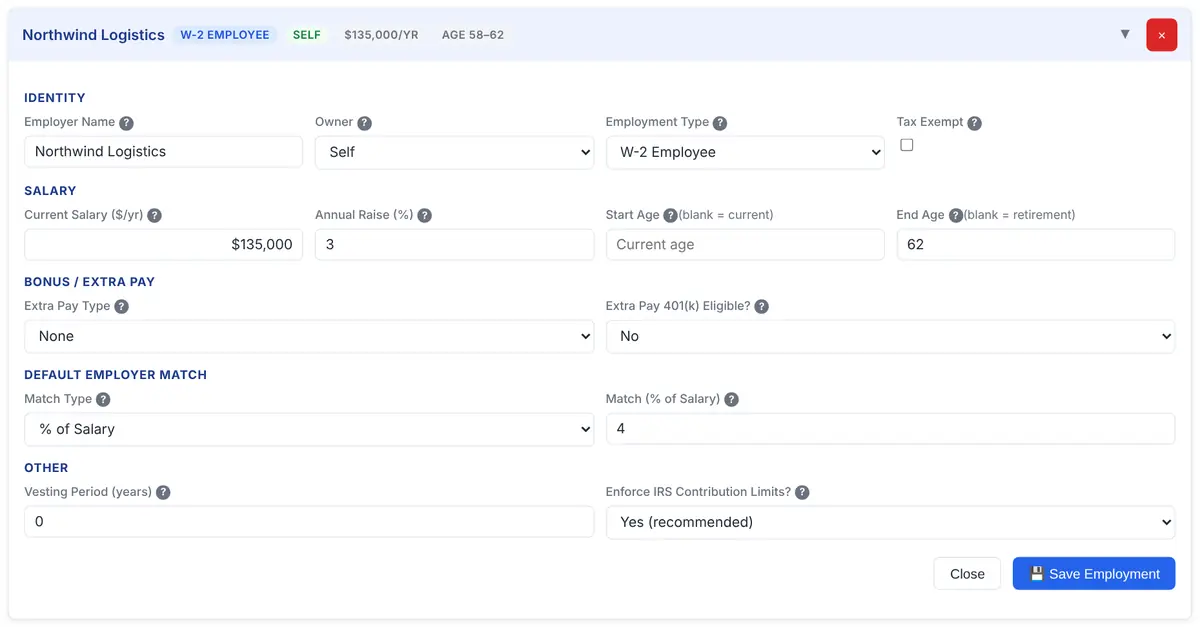
Employment fields
| Field | What it means | Default |
|---|---|---|
| Employer Name | A label for the job. | — |
| Owner | Self or Spouse. The job follows that person's ages. | Self |
| Employment Type | W-2 Employee or Self-Employed / 1099. Self-employed work uses the self-employed contribution limit. | W-2 Employee |
| Tax Exempt | Tick only if this pay is free of federal income tax (for example some combat-zone military pay). It then shows as tax-free income. | off |
| Current Salary ($/yr) | Gross yearly pay today, or net self-employment income. | — |
| Annual Raise (%) | How much the salary grows each year. | 3% |
| Start Age | Age the job starts. Blank = now. | blank |
| End Age | Age the job ends. Blank = that person's retirement age. The job is paid through this age. | blank |
Bonus and extra pay
Under Bonus / Extra Pay, Extra Pay Type has three choices:
- None
- Flat Amount (bonus, overtime, commission…) — then fill in Extra Pay Amount ($/yr).
- % of Salary (bonus, profit share…) — then fill in Extra Pay (% of Salary).
Extra Pay 401(k) Eligible? says whether your 401(k) percentage also applies to this extra pay. Many plans leave it out, so check your plan papers.
Employer match
Under Default Employer Match, Match Type sets what your employer adds to every account linked to this job:
- No Default Match
- Flat Dollar Amount — a fixed Match Amount ($/yr).
- % of Salary — Match (% of Salary), for example 4 means 4% of salary.
You can change the match for a single account on that account's card. See Investments and accounts.
Other settings
| Field | What it means | Default |
|---|---|---|
| Vesting Period (years) | Years until the employer's match is fully yours. 0 = right away. | 0 |
| Enforce IRS Contribution Limits? | Yes (recommended) caps your contributions at the IRS limits. No lets them go over, and a ⚠ warns about the 6% excess-contribution tax. | Yes |
Note: If a W-2 job ends before 59½, a ⚠ next to End Age warns that an unpaid 401(k) loan could count as a taxable withdrawal. If the job ends in or after the year you turn 55, a note may say the Rule of 55 applies.
Other Income
Use Other Income for money that doesn't fit the other tabs: rent from a property, consulting fees, alimony, royalties, or a one-time payment. The table's heading is Retirement Income Sources.
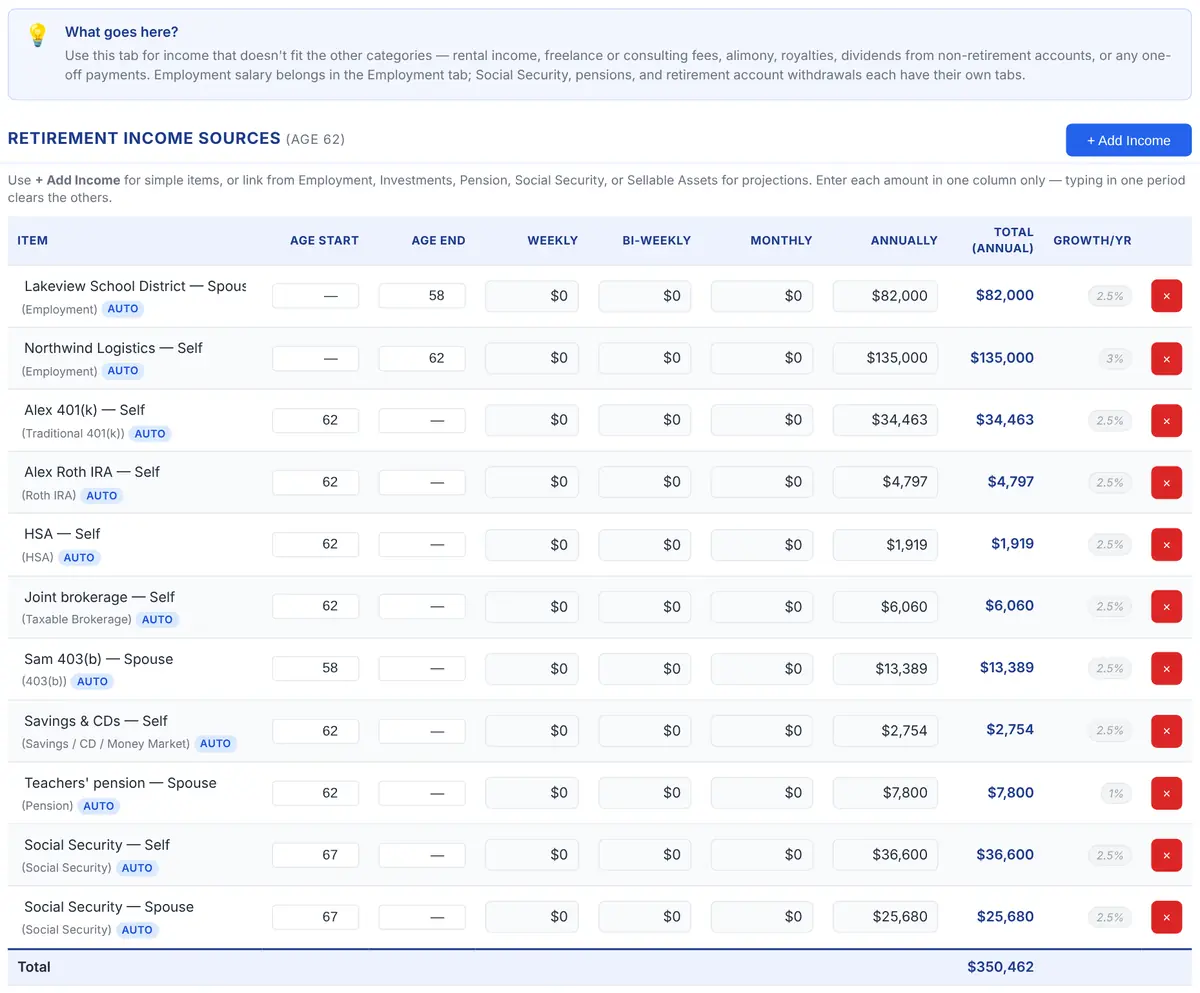
Add an income row
- Click + Add Income.
- Type a name in Item.
- Type the amount in one column only: Weekly, Bi-Weekly, Monthly or Annually. Typing in one column clears the others.
- Optional: set Age Start and Age End.
- Optional: click the Growth/yr badge to change how the amount grows.
Total (Annual) shows the yearly amount. Weekly is counted 52 times a year, bi-weekly 26 times, monthly 12 times. Click × to remove a row.
| Column | What it means |
|---|---|
| Age Start | The age this income begins. Blank = this year. |
| Age End | The last age it is paid. Blank = through your life expectancy. |
| Growth/yr | Blank shows the plan inflation rate. 0% keeps it fixed. Any other rate is used as typed. Click the badge, type a rate, then Done; plan % goes back to the plan rate. |
Tip: For a one-time payment, use Annually and set Age Start and Age End to the same age.
Rows you can't edit here
The table also lists income from the other tabs: salary from Employment, Social Security, pensions, account withdrawals and home sales. These rows are gray and marked auto. Pointing at them shows "Managed by the Investments, Pension, Social Security, or Employment tab".
To change one, go to the tab it comes from. Their Growth/yr badge shows where its growth is set — for example "Set on the Employment tab (annual raise)".
Example: the Rivera family
| Alex | Sam | |
|---|---|---|
| Employer Name | Northwind Logistics | Lakeview School District |
| Owner | Self | Spouse |
| Current Salary ($/yr) | $135,000 | $82,000 |
| Annual Raise (%) | 3 | 2.5 |
| End Age | 62 | 58 |
| Default Employer Match | % of Salary, 4 | none entered |
Alex's 4% match flows into Alex 401(k), which is linked to the Northwind job. The Riveras have no other income, so the Other Income tab shows only auto rows: salaries, Social Security, Sam's pension, account withdrawals and the home sale.
Good to know
- A job with no End Age stops at that person's retirement age. A job that ends earlier than the retirement age can leave a gap; see The "No paycheck" note.
- Salary is ordinary income for tax. Money you put into a traditional 401(k) or 403(b) lowers taxable pay.
- Deleting a job asks first. Accounts linked to it stay, but they no longer get salary-based contributions from it.