Withdrawal sequences
A withdrawal sequence is your own rule for which accounts pay, how much, and at which ages. Use one when you want a fixed amount from savings for a few years, or a limit on a traditional account. For every other year, your withdrawal method still applies.
Where to find it
- Click ↓ Withdrawals in the header.
- At the bottom of the Withdrawals card, click Advanced: withdrawal sequences. The number on the right is how many sequences the plan has. The region opens by itself when there is at least one.
- With no sequences yet, it says: "No overrides yet — the method you chose above applies to every year."
What a sequence is
A sequence has three parts:
| Part | Meaning |
|---|---|
| Age range | Start age and End age, both included. Blank start = today; blank end = life expectancy. |
| Slots | An ordered list of accounts — ACCOUNT DRAW ORDER — LEFTMOST TAPPED FIRST. When a slot hits its limit or runs dry, the next one takes over ("overflow"). |
| Draw mode | How much the sequence takes each year (see the table below). |
Ages are the plan owner's ages. An account owned by the spouse follows the spouse's age.
Sequences work with both methods:
- With Optimal, sequences run first, and Optimal then tops up whatever is still needed.
- With Custom, an account in a sequence is drawn only by its sequences. Other accounts keep their own strategy.
An account in a sequence shows ⚙ Managed by Withdrawal Sequence on its card in Investments & Accounts. Hover the badge to see which sequences use it.
Draw modes
| Mode | What it draws each year | Group |
|---|---|---|
| ⚡ Cover shortfall | Exactly what is still missing that year, slot by slot. Never more. | ② Fills the remaining gap |
| 📅 Fixed / manual | The Annual amount you set. With Yes — grow with plan inflation it grows each year. | ① Always drawn |
| % Percent of balance | Annual percent (%) of each slot's balance at the start of the year (default 4). | ① Always drawn |
| 🏛 RMD | The IRS required minimum from traditional accounts, from 73 (75 if born 1960 or later). Nothing before. | ① Always drawn |
| 💰 Dividend | Only the yield; the principal stays invested. Uses each account's Dividend / Yield Rate (% per year). | ① Always drawn |
"Always drawn" sequences take their amount every year in their age range, even if you don't need the money. Anything you don't spend becomes extra money; see Surplus and extra money.
Create a sequence
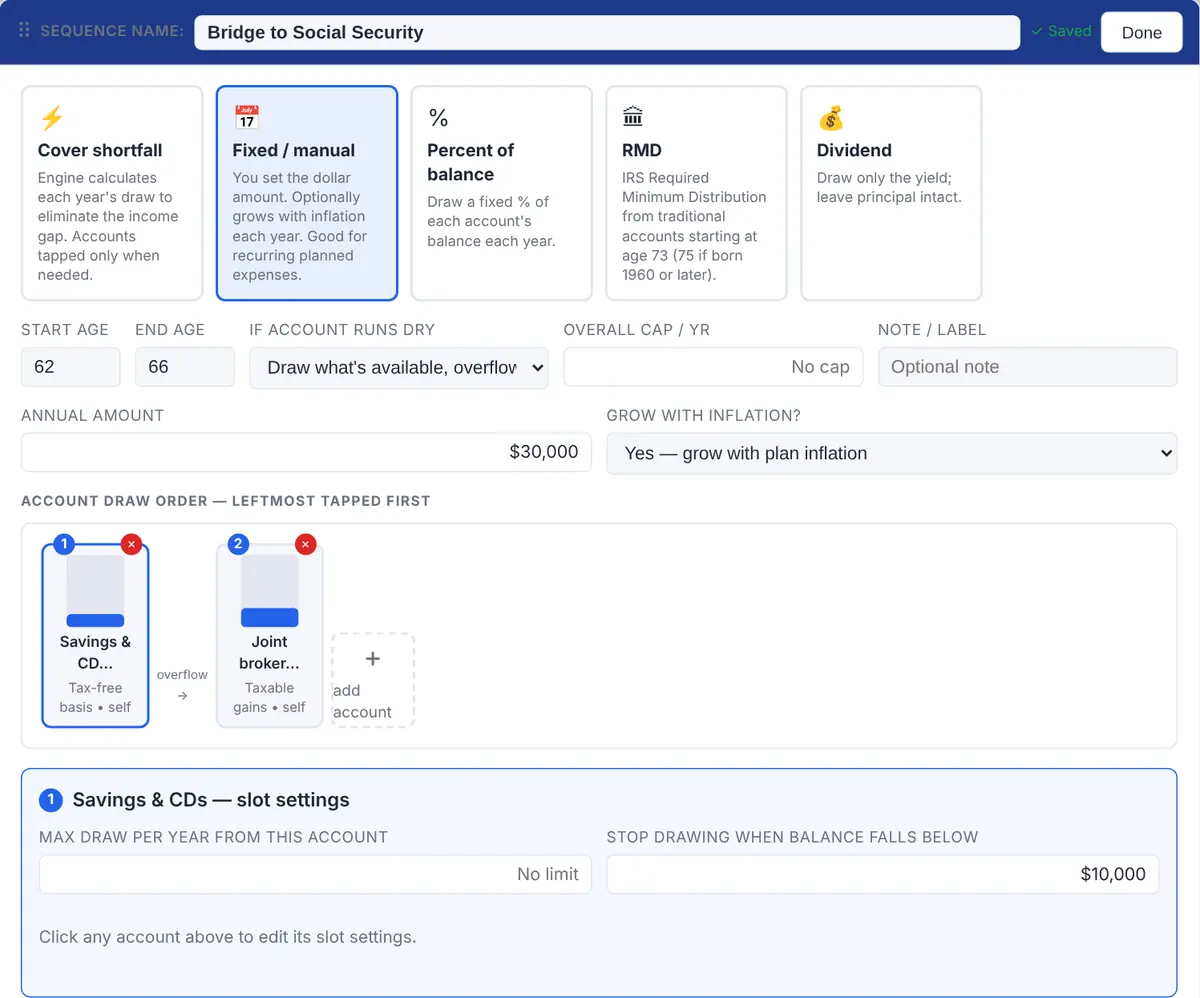
- Click + New Sequence. The editor opens as a floating window. Drag its header to move it; press Esc or Done to close.
- Type a name in Sequence Name:. Names must be unique in the plan.
- Click a draw mode card.
- Enter Start age and End age.
- Fill the mode's fields: Annual amount and Grow with inflation? for Fixed, or Annual percent (%) for Percent of balance.
- Under ACCOUNT DRAW ORDER — LEFTMOST TAPPED FIRST, click + add account and pick an account. Repeat for each account, in the order they should pay.
- Click ✓ Save. From then on every change saves by itself and the header shows ✓ Saved.
Set limits
Click an account tile in the editor to open its slot settings:
| Field | Applies to | What it does | Default |
|---|---|---|---|
| Max draw per year from this account | One slot | The most this sequence takes from that account in a year. The tile then shows "max $…/yr". | No limit |
| Stop drawing when balance falls below | One slot | A floor the sequence leaves in the account, such as an emergency reserve. It limits this sequence only. | $0 — drain fully |
| Overall cap / yr | Whole sequence | One yearly budget shared by all its slots. | No cap |
| Note / label | Whole sequence | Free text for your own reference. | — |
A floor stops only this sequence. Under Optimal, the plan may still draw the same account to top up your need. To keep Optimal away from an account, give that account a later Withdrawal Start Age.
Run order with several sequences
Each year, sequences run in two groups:
- ① Always drawn — Fixed, Percent of balance, RMD and Dividend sequences, top to bottom.
- ② Fills the remaining gap — Cover shortfall sequences, top to bottom.
- Then your withdrawal method tops up.
The blue number on each card is its place in the run order (hover it: "Runs #2"). Use ▲ (Run earlier) and ▼ (Run later) to change the order within a group. A Cover shortfall sequence always runs after every always-drawn one.
Order matters in two cases:
- Sharing an account. The same account can be in several sequences. The earlier one draws first, and the card of the later one says "Shares … with #1 — draws only what #1 leaves".
- Several Cover shortfall sequences. The first one fills as much of the gap as it can.
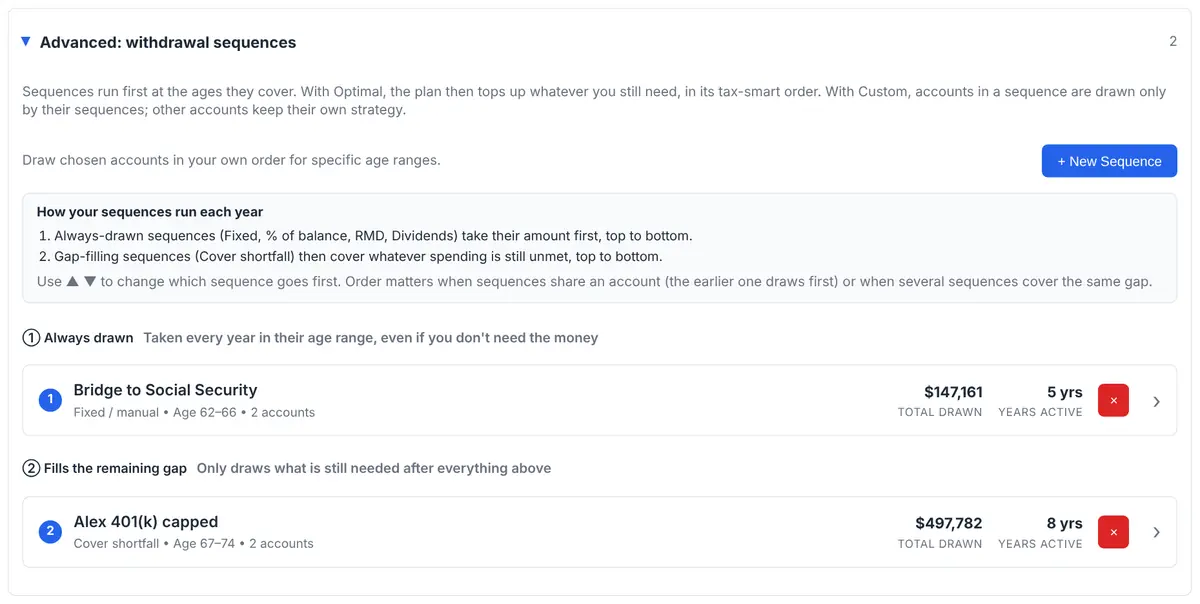
Each card shows total drawn and years active over the whole plan — a quick check that the sequence does what you expect.
Read the Projected draws by year table
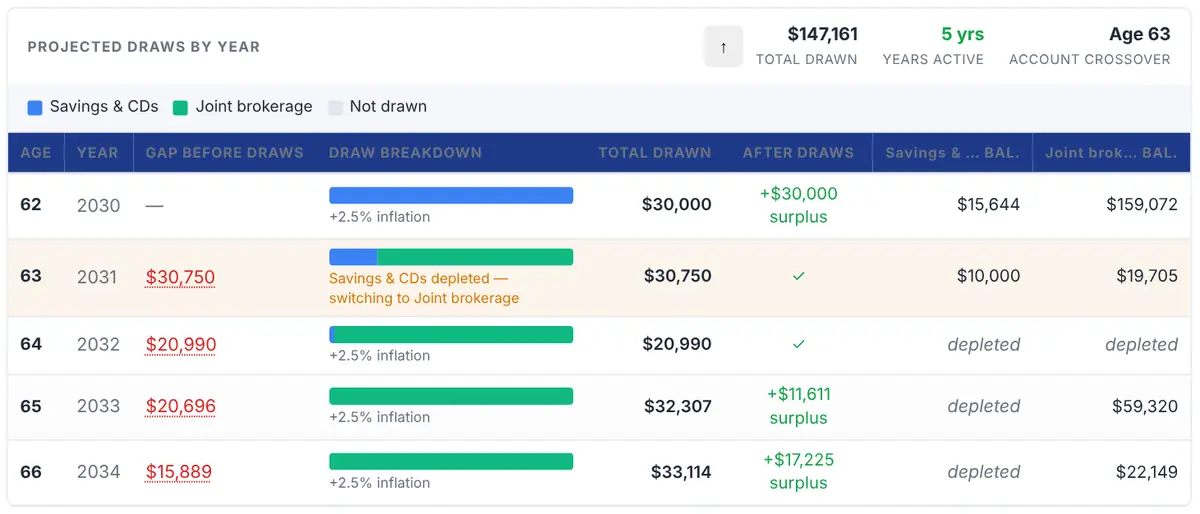
After you save, the editor shows PROJECTED DRAWS BY YEAR. The strip on top shows Total drawn, Years active and, when one slot hands over to the next, Account crossover (the first age it happens).
| Column | Meaning |
|---|---|
| AGE / YEAR | Plan owner's age and the calendar year. |
| GAP BEFORE DRAWS | Spending not covered by other income, before this sequence draws. Hover for the breakdown. |
| DRAW BREAKDOWN | A bar coloured by account. Notes such as "at its $…/yr max — rest from …" or "depleted" explain why a slot stopped. Grey = Not drawn. |
| TOTAL DRAWN | This sequence's draws that year. |
| AFTER DRAWS | Red = spending still uncovered after the draws. Green + = draws beyond spending. ✓ = covered. |
| account BAL. | Each account's real year-end balance, the same as in Account Balances. |
Edit, rename or delete
- Edit: click anywhere on the card. Changes save about a second after you stop typing.
- Rename: type in Sequence Name:. If the name is taken, the editor shows ⚠ Not saved and asks you to choose a different name; Done stays disabled until you fix it.
- Change the account order: remove accounts with the red × on their tile and add them back in the new order.
- Delete: click the red × on the card and confirm "Delete "…"?". Those accounts go back to Optimal or their own strategy.
- Start age must be below End age; until it is, changes are not saved.
Example: a fixed bridge until Social Security
The Rivera family wants a steady $30,000 a year from cash while Alex is 62 to 66, before both Social Security benefits start at 67.
- + New Sequence, name it "Bridge to Social Security".
- Choose Fixed / manual.
- Start age 62, End age 66.
- Annual amount $30,000, Yes — grow with plan inflation.
- Add Savings & CDs, then Joint brokerage.
- Click the Savings & CDs tile and set Stop drawing when balance falls below to $10,000 as a reserve.
- ✓ Save, then read the preview: you see when savings reach the floor and brokerage takes over.
Optimal still tops up the rest of each year's need, in its usual order.
Example: capping a traditional account
To spread taxable draws across both 401(k)-type accounts, the Riveras add a second sequence:
- + New Sequence, name it "Alex 401(k) capped", keep Cover shortfall.
- Start age 67, End age 74 (the year before RMDs start at 75).
- Add Alex 401(k), then Sam 403(b).
- Click the Alex 401(k) tile and set Max draw per year from this account to $25,000.
Each year, Alex's 401(k) pays up to $25,000 of the gap and Sam's 403(b) pays the rest. Sam's 403(b) follows Sam's age. Because this sequence covers the gap, it runs after the always-drawn bridge.
Good to know
- Sequence draws are real withdrawals. They lower balances, are taxed by account type and count toward ACA and IRMAA income.
- A sequence draws at every age it covers — even before 59½. A traditional-account draw then pays the 10% penalty (20% for non-medical HSA draws), even if Allow withdrawals before age 59½ is off. Plan Alerts shows it.
- A sequence draw from a traditional account counts toward that account's RMD; no second RMD is taken.
- Under Optimal, anything a Cover shortfall sequence can't pay (all slots capped or empty) is topped up by Optimal. Under Custom, it becomes a shortfall.
- Total drawn $0? Check that the ages are inside the plan, that an RMD sequence isn't before RMD age, that a Dividend account has a yield, and that the floor is below the balance.
- What-if tools (Stress Test, Monte Carlo, Shortfall Wizard) re-size Cover shortfall and Percent of balance draws for each scenario.