Roth conversions
A Roth conversion moves money from a traditional (pre-tax) account into a Roth account. You pay income tax on it now, and later withdrawals from the Roth are tax-free. This page shows how to plan conversions and how to read the Conversion Impact card.
Note: These are planning estimates, not tax or investment advice. Whether a conversion pays off depends on your own tax situation; check with a tax professional and irs.gov.
Why convert
- Pay tax at a lower rate. The years between retirement and Social Security often have low income. Converting then may cost less tax than withdrawing the money later.
- Smaller required minimums. Less money left in traditional accounts means smaller RMDs from 73 or 75, and less taxable income in your 70s.
- Tax-free money later. Roth withdrawals don't count as taxable income.
The trade-off: the tax is paid now, and higher income in conversion years can cost ACA premium help or raise Medicare premiums (IRMAA) two years later.
Where to find it
Click ↓ Roth Conversions in the header. The Roth Conversions card sits below Withdrawals. You need at least one traditional account and one Roth account in Investments & Accounts; otherwise the card tells you what to add.
Add a conversion
- Click + Add Conversion.
- Choose the Conversion Type: Fixed amount or Fill to bracket.
- Pick the Owner, From (Traditional Account) and To (Roth Account).
- Fill the fields for the type (below).
- Optionally type a Note (optional), such as "stay under IRMAA".
- Click 💾 Save Conversion. The card header then shows the accounts, the owner and the ages.
Fixed amount
Converts one amount, once.
| Field | What it means |
|---|---|
| Amount ($) | The dollars to convert. Taxed as ordinary income that year. |
| Conversion Age | The owner's age in the year of the conversion. A ⚠ appears under 59½: Roth earnings withdrawn within 5 years may be taxable. |
Fill to bracket
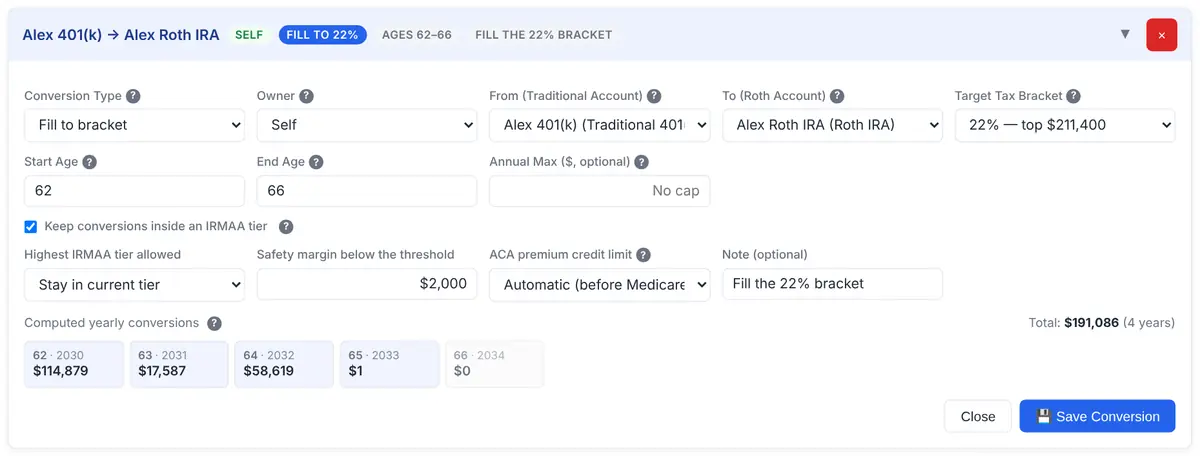
The app works out the amount for you each year: just enough to bring federal taxable income up to the top of the bracket you choose, never into the next one.
| Field | What it means | Default |
|---|---|---|
| Target Tax Bracket | The bracket to fill, for example 22%. Tops shown are today's; the projection raises them with inflation each year. | — |
| Start Age / End Age | The years the conversions run, in the owner's age. Conversions stop the year before RMDs begin, even if you enter a later end age. | — |
| Annual Max ($, optional) | A ceiling for any one year. | No cap |
| Keep conversions inside an IRMAA tier | Lowers each year's conversion so Medicare premiums two years later stay within a tier. | Off |
| Highest IRMAA tier allowed | Stay in current tier keeps you in the tier your income is already in without the conversion. Standard premium (tier 0) or Tier 1–Tier 4 set the limit yourself. | Stay in current tier |
| Safety margin below the threshold | Dollars to stay below the tier line, as a cushion. | — |
| ACA premium credit limit | Automatic (before Medicare) keeps income below 400% of the poverty level in ACA years. Cap at an FPL target lets you set Max income (% of poverty level). Ignore ACA credits turns it off. | Automatic (before Medicare) |
Under the fields, Computed yearly conversions lists each year's amount. Hover a year to see the math: bracket top minus the taxable income you already have. A year can also show "+$… IRMAA in …" when the conversion raises a later Medicare premium.
How the tax is paid
The tax on a conversion is paid from Savings / CD / Money Market accounts first, then Taxable Brokerage. The amount set aside equals the real increase in that year's tax, including knock-on effects such as losing ACA help. The projection shows it as "Withdrawals to pay Roth conversion tax". If there is no savings or brokerage account, the tax simply lowers that year's after-tax income.
Read the Conversion Impact card
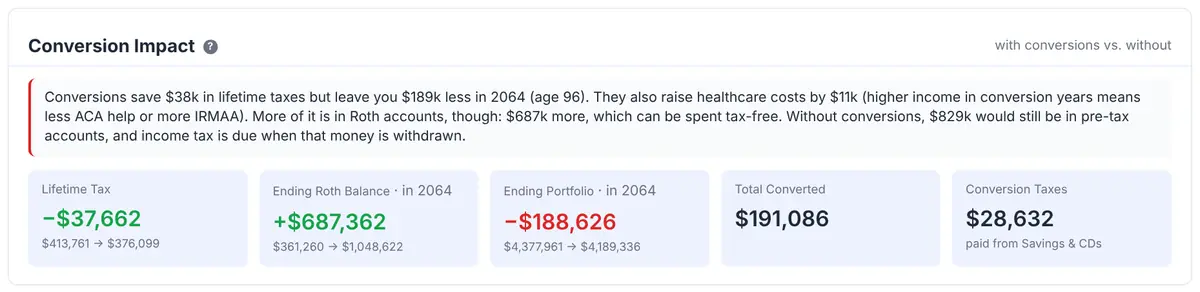
Below your conversions, Conversion Impact compares your plan with conversions vs. without. "Without" is the same plan with only the conversions removed; everything else, including your sequences, stays.
| Tile | What it shows |
|---|---|
| Lifetime Tax | The change in total tax over the whole plan, with both amounts underneath (without → with). Negative is good. |
| Ending Roth Balance | The change in Roth money in the plan's last year. |
| Ending Portfolio | The change in all accounts in the plan's last year — the same year and totals as the last row of the year-by-year table. |
| Total Converted | Everything moved to Roth. |
| Conversion Taxes | The tax the conversions add, and which accounts paid it. |
| Break-even age | The age when the portfolio is back to the no-conversion level. Shown only when there is one. |
Above the tiles, a sentence sums it up, for example: "Conversions save $… in lifetime taxes and leave you $… more in [year] (age [age])." It can add:
- that conversions raise healthcare costs (less ACA help or more IRMAA), when the increase is over $1,000;
- the break-even age;
- when the portfolio ends lower but holds more Roth: how much would still be in pre-tax accounts without conversions, where income tax is still due.
Example: "Fill the 22% bracket"
The Rivera plan has one conversion:
| Field | Value |
|---|---|
| Conversion Type | Fill to bracket |
| Owner | Self (Alex) |
| From (Traditional Account) | Alex 401(k) |
| To (Roth Account) | Alex Roth IRA |
| Target Tax Bracket | 22% (married filing jointly) |
| Start Age / End Age | 62 – 66 |
| Keep conversions inside an IRMAA tier | On, Stay in current tier |
| Note (optional) | Fill the 22% bracket |
Why these years: Alex stops working at 62 and both Social Security benefits start at 67, so income is lowest in between. Before 65 the household is on ACA coverage, so the automatic ACA limit can also reduce some years' amounts.
To test a change, raise the Target Tax Bracket to 24% and watch Lifetime Tax and Ending Portfolio in the impact card.
Good to know
- Conversions count as income in the Social Security tax test, so they can make more of your benefit taxable. The bracket math includes this.
- An RMD must be taken first and can't be converted, which is why conversions stop before RMD age.
- Plan Alerts warns when a conversion itself moves you into a higher IRMAA tier or over the ACA cliff.
- The Social Security optimizer shows how much was converted in the years before you claim.