Pensions and assets
Add a pension that pays you each month, and things you plan to sell, such as your home or a business. Both appear in your income in the years they pay.
Where to find it
Open the Income card and use these tabs:
| Tab | What goes there |
|---|---|
| Pension | A traditional (defined-benefit) pension from an employer or a government |
| Sellable Assets | Real Estate, a Business, a Vehicle or Other assets you plan to sell |
Workplace savings plans such as a 401(k) are accounts, not pensions. Add them on Investments & Accounts. See Investments and accounts.
Pensions
Add a pension
- Open the Pension tab and click + Add Pension.
- The app adds "My Pension" and opens it.
- Fill in the fields below.
- Click 💾 Save Pension, or Close. Later changes are saved on their own.
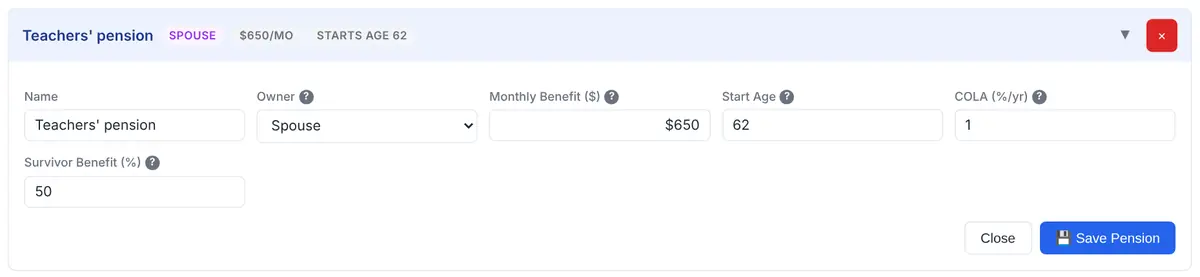
The card header shows the name, the owner, the monthly amount and starts age with the start age.
| Field | What it means | Default |
|---|---|---|
| Name | A label, for example "Teachers' pension". | My Pension |
| Owner | Self or Spouse — whose pension it is. Its start age is that person's age. | Self |
| Monthly Benefit ($) | The monthly payment from your pension statement, before any survivor reduction. | 0 |
| Start Age | The age payments begin. | 65 |
| COLA (%/yr) | Cost-of-living adjustment: how much the payment rises each year. Many private pensions have none (0). | 0 |
| Survivor Benefit (%) | The share of the payment your spouse keeps after you die, from 0 to 100. | 0 |
How the plan uses a pension
- Payments start in the year the owner reaches the Start Age: 12 × the monthly benefit a year.
- The payment grows by COLA (%/yr), not by the plan's inflation rate. With 0% COLA, the payment stays the same, so it buys less each year.
- A pension is taxed as ordinary income.
- After the owner dies, the surviving spouse gets Survivor Benefit (%) of the payment. With 0%, the pension stops.
- The pension shows as an auto row on the Other Income tab.
Tip: Your pension office can tell you the monthly amount for different start ages and survivor options. A higher survivor percent usually means a lower monthly payment while you are both alive. Enter the amount for the option you plan to choose.
Sellable assets
Use a sellable asset for something you will sell during the plan, for example downsizing your home. The money from the sale, after costs and tax, comes into the plan in the year you sell.
Add an asset
- Open the Sellable Assets tab and click + Add Asset.
- The app adds "My Asset" and opens it.
- Fill in the fields below.
- Click 💾 Save Asset. Changes to an asset are kept only when you click 💾 Save Asset.
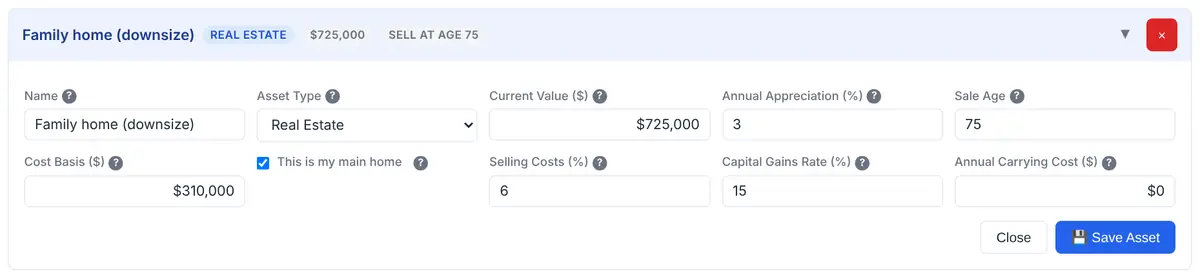
The card header shows the name, the type, the value today and sell at age with the sale age.
| Field | What it means | Default |
|---|---|---|
| Name | A label, for example "Family home (downsize)". | My Asset |
| Asset Type | Real Estate, Business, Vehicle or Other. | Real Estate |
| Current Value ($) | What it would sell for today. | 0 |
| Annual Appreciation (%) | How much the value grows each year until the sale. | 3% |
| Sale Age | Your age (Self) in the year you sell. | 65 |
| Cost Basis ($) | What you paid, plus the cost of major improvements. | 0 |
| This is my main home | Real estate only. See Selling your main home. | off |
| Selling Costs (%) | Agent fees, closing costs and transfer taxes, as a percent of the sale price. | 6% |
| Capital Gains Rate (%) | The tax rate on the gain. Long-term rates are usually 0%, 15% or 20%. | 15% |
| Annual Carrying Cost ($) | Yearly cost of owning it until the sale: property tax, insurance, upkeep, HOA. | 0 |
How the sale is worked out
- Sale price = today's value, grown by the appreciation rate each year until the sale.
- Selling costs = sale price × Selling Costs (%).
- Gain = sale price − selling costs − cost basis. A main home can exclude part of the gain (below).
- Tax = gain × Capital Gains Rate (%).
- Net proceeds = sale price − selling costs − tax.
The net proceeds appear once, as income in the sale year. The gain also counts toward your income for Medicare IRMAA and ACA help. See IRMAA.
Annual Carrying Cost ($) is added to your expenses every year from now until the sale. After the sale it stops.
Note: If you keep paying for a home after you sell it — for example a smaller home or rent — add that cost on the Expenses card from the sale age.
Selling your main home
For Real Estate, tick This is my main home if you have lived in it for 2 of the last 5 years before the sale. Up to $250,000 of gain ($500,000 for married filing jointly) is then left out of income. It isn't taxed and doesn't raise your income for IRMAA. Only the gain above that is taxed. A loss on a home can't be deducted.
Where the money goes
In a year with more money coming in than going out, the extra is either kept in an account for later years or treated as spent. You choose this under Extra money in retirement. See Surplus.
Example: the Rivera family
Pension
| Field | Value |
|---|---|
| Name | Teachers' pension |
| Owner | Spouse (Sam) |
| Monthly Benefit ($) | $650 |
| Start Age | 62 |
| COLA (%/yr) | 1 |
| Survivor Benefit (%) | 50 |
Sam's pension starts at $7,800 a year when Sam turns 62, and rises 1% a year. If Sam dies first, Alex keeps 50% of it.
Sellable asset
| Field | Value |
|---|---|
| Name | Family home (downsize) |
| Asset Type | Real Estate |
| Current Value ($) | $725,000 |
| Annual Appreciation (%) | 3 |
| Sale Age | 75 (Alex's age) |
| Cost Basis ($) | $310,000 |
| This is my main home | on |
| Selling Costs (%) | 6 |
Because it is their main home and they file jointly, the first $500,000 of gain is left out of income.
Good to know
- These figures are planning estimates. Real sale prices, costs and taxes depend on the market and on tax rules at the time. Ask a tax professional about your sale.
- To test selling at a different age without changing the plan, try the shortfall wizard. See Shortfalls.
- Deleting a pension or asset asks first.