Worked examples
Four walkthroughs with the sample Rivera family, from question to answer. Each one shows where to click and where to look. The numbers you see depend on today's date and your version of the app, so the steps say where to look rather than what you will find.
All results are planning estimates, not tax, legal or investment advice.
The Rivera family
| Alex | Sam | |
|---|---|---|
| Born | April 1968 | September 1970 |
| Job | Northwind Logistics, $135,000, 3% raises, works to 62, 4% employer match | Lakeview School District, $82,000, 2.5% raises, works to 58 |
| Accounts | 401(k) $610,000 (10% contribution); Roth IRA $95,000 | 403(b) $285,000 (8% contribution) |
| Social Security (monthly at 62 / 67 / 70) | $2,150 / $3,050 / $3,790, claims at 67 | $1,500 / $2,140 / $2,650, claims at 67 |
| Pension | — | Teachers' pension $650/month from 62, 50% survivor, 1% COLA |
| Life expectancy | 92 | 94 |
Shared: joint brokerage $120,000 (cost basis $85,000), savings & CDs $60,000, HSA $38,000. Home worth $725,000 (cost basis $310,000), growing 3% a year, sold at 75. Mortgage $2,100 a month to 66. Married filing jointly, Oregon, inflation 2.5%. Withdrawal method: Optimal.
1. Can we retire at 62 and 58?
The question: if Alex stops at 62 and Sam at 58, does the money last?
- Open Rivera Family Plan. In the Age section, check Age at Retirement: 62 for Alex, 58 for Sam. Check Life Expectancy: 92 and 94.
- Look at the Summary cards: Annual Retirement Income Required, Yearly Surplus / Shortfall and Years to Retirement. A red surplus card means spending is higher than income in the first year of retirement.
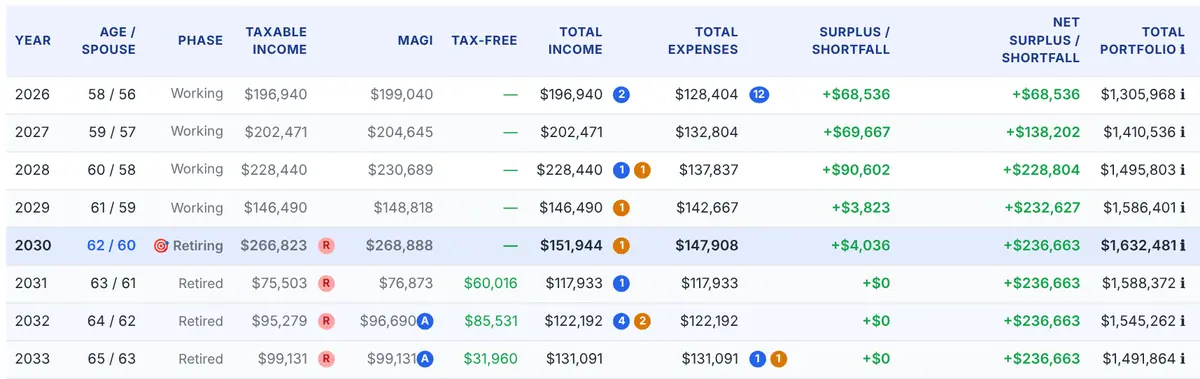
- Click ↓ Year-by-Year Projection in the header.
- Read the Phase column. Years show Working, 🎯 Retiring and Retired. The phase follows Alex, the first person in the plan, so the years after Sam stops working but before Alex retires still read Working. Gap years appear only when the first person's own job ends before their retirement age.
- Read the Surplus / Shortfall column. A red cell is a year where income and planned withdrawals don't cover spending. See Shortfalls.
- Read Total Portfolio to the last row. If it stays above zero through age 94, the plan lasts — on these assumptions.
- Click ↓ Account Balances to see which account pays for which years.
- Click ↓ Stress Test and ↓ Monte Carlo to see how the plan holds up in a market crash, high inflation and many random markets. See Stress test and Monte Carlo.
Tip: If a year is red, click the red cell. The Fix Shortfall wizard tries changes such as retiring later or spending less, without changing your plan.
2. Bridge to Medicare with the ACA guard
Sam retires at 58, Alex at 62. Both need health insurance until Medicare at 65. The ACA marketplace gives a premium credit only while household income stays under a limit. One dollar over can cost the whole credit — the subsidy cliff.
- Click ↓ Healthcare. In the Household card, check that both Alex and Sam are included, the state is Oregon and premium growth is 5%.
- Under Coverage for, switch between Alex and Sam and check the coverage: ACA marketplace before 65, Medicare from 65, Part D $45, Medigap $210 and dental/vision $40 a month.
- In the Household card, find Protect against income cliffs (Optimal withdrawals).
- Check that Protect my ACA credit when withdrawing is On and Keep income under is set to Stay under the subsidy cliff. The line under it says how much premium credit the guard could keep.
- Open the results region. Compare the pre-65 premiums year by year, for the household and for each person.
- In the projection, read the MAGI column for the years before 65. With the guard on, the app draws from Roth instead of the 401(k) when that keeps income under the limit.
- Open Plan Alerts in the header. Look for ACA Credit Protected or ACA Cliff Can't Be Avoided.
Note: The guard works only with the Optimal withdrawal method. It never cuts required withdrawals and never creates a shortfall.
More: Healthcare, IRMAA, Withdrawals.
3. Roth conversions: with or without?
The Riveras' plan converts money from Alex's 401(k) to Alex's Roth IRA each year from 62 to 66, using Fill to bracket up to the 22% bracket, with IRMAA in mind. Is it worth the tax now?
Quick look in one plan:
- Click ↓ Roth Conversions. Find the conversion: Alex 401(k) → Alex Roth IRA, ages 62–66.
- Read the Conversion Impact card, with conversions vs. without: Lifetime Tax, Ending Roth Balance, Ending Portfolio, Total Converted, Conversion Taxes and Break-even age.
Side by side, as two plans:
- With the plan open, click Clone Plan. The copy is named "Rivera Family Plan-Copy#1". Rename it, for example "Rivera — no conversions".
- In the copy, delete the Roth conversion.
- Go to the Home page. Tick both plan cards, then click Compare Selected Plans.
- Compare Shortfall years, Ending portfolio, the tax rows and the Monte Carlo row. The better value in each row is green.
- Turn off Show identical rows to see only what differs.
Note: Conversions trade a known tax bill now for tax-free money later. Whether that pays off depends on future tax rates, which nobody knows. Talk to a tax professional before you act.
More: Roth conversions, Compare plans, Plan files.
4. Rule of 55 for Sam's 403(b)
Sam leaves Lakeview School District at 58, before 59½. Withdrawals before 59½ usually cost a 10% IRS penalty. The Rule of 55 removes the penalty for the plan of the employer you leave in or after the year you turn 55.
- Click ↓ Income, open the Investments & Accounts tab and open Sam's 403(b).
- Find the Rule of 55 row. The age under Age you turn in the year you leave comes from Sam's Lakeview job.
- Read the status chip. When the rule applies, it starts with ✓ Penalty-free from age … and names the employer.
- Click What's this? for a plain-words explanation for Sam's account.
- In the projection, find the Penalties column for Sam's years from 58 to 59. A $0 ✓ cell means the rule removed the penalty; hover over it to see how much it saved.
- Open Plan Alerts and read the Rule of 55 card.
Tip: Alex's Roth IRA and any IRA never qualify for the Rule of 55. Only workplace plans — 401(k) and 403(b) — of the job you leave.
More: Rule of 55, Accounts, Plan Alerts.