Plan Alerts
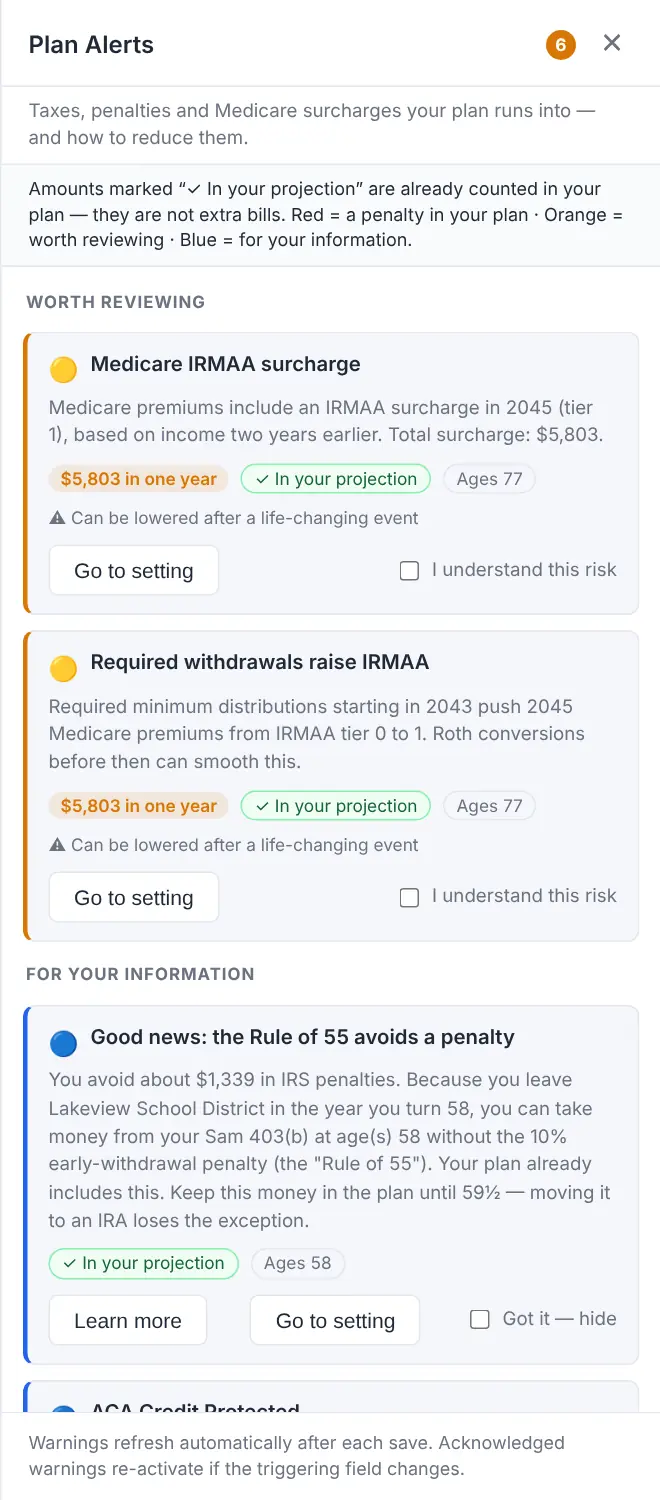
Plan Alerts point out taxes, penalties, Medicare surcharges and settings in your plan that are worth a second look, and how to reduce them. This page explains the Alerts button, the alert cards and the most common alerts.
Where to find it
The Alerts button sits in the header of the plan editor, on the same row as the plan buttons.
- ⚠ Alerts (N) — N alerts are waiting for you. Click to open them.
- Alerts with no number — nothing needs attention.
Clicking the button opens the Plan Alerts drawer on the right side of the window. Click ✕ or anywhere outside the drawer to close it.
The app scans your plan again after every save, so the list is always up to date.
How alerts are organized
The drawer has up to three groups. The color on the left edge of each card matches its group.
| Group | Icon and color | What it means |
|---|---|---|
| Penalties in your plan | 🔴 red | Your plan, as entered, pays an IRS penalty or extra tax. |
| Worth reviewing | 🟡 orange | Something could cost you money or may not be what you meant. |
| For your information | 🔵 blue | Good to know, often good news. |
At the top, a short note says: amounts marked ✓ In your projection are already counted in your plan's taxes and expenses. They are not extra bills on top of it.
Reading an alert card
Each card has a title, a plain explanation and a row of small labels:
| Label | Meaning |
|---|---|
| Cost chip | What it costs, for example "≈ $1,200 a year on average · 5 years · $6,000 total" or "$3,400 in one year". |
| ✓ In your projection | That cost is already included in the projection. |
| Ages … | The ages it affects, for example "Ages 62–64, 67". |
| ⚠ Exceptions may apply | Some IRS exceptions could remove the penalty. Hover to read which. |
| ⚠ Can be lowered after a life-changing event | For IRMAA: after retirement, marriage, divorce or a spouse's death you can ask Social Security to use your new, lower income (Form SSA-44). |
Below the labels you may find buttons:
- Go to setting — closes the drawer, opens the section that causes the alert and scrolls to it. The setting flashes briefly so you can find it.
- Learn more — on Rule of 55 cards. Opens a plain explanation of the rule. See Rule of 55.
- On ACA cards, a button to turn on the ACA guard and one to show the setting. See Healthcare.
Dismissing an alert
Each card has a checkbox at the bottom:
- I understand this risk on red and orange cards.
- Got it — hide on blue cards.
Tick it to dismiss the alert. The card fades and no longer counts on the Alerts button. Untick it to bring it back.
When a dismissed alert comes back
A dismissed alert comes back by itself when the setting behind it changes. For example, you dismiss an early-withdrawal alert for an account that starts withdrawals at 58, then change the start age to 57. The alert returns, because the risk is now different.
Note: Dismissing only hides a card. It does not change your plan or remove the cost from the projection.
The "New penalty" notice
When a change you make adds a new penalty (a red alert), a dark notice appears at the bottom of the window, for example "New penalty: Early Withdrawal - 10% Penalty Risk ($2,500 in one year)". If more than one is new, it says "2 new penalties: … and 1 more".
- Click View to open the drawer at that alert. The card is outlined for a moment.
- Click × to close the notice.
The notice disappears after about 8 seconds; it stays while your pointer is over it. It never appears when you just open or switch plans, and orange or blue alerts never trigger it. The Alerts button pulses instead.

Common alerts
| Alert title | Group | What it means and what to try |
|---|---|---|
| Early Withdrawal - 10% Penalty Risk | Red | Withdrawals from a 401(k), 403(b) or traditional IRA before age 59½ pay a 10% IRS penalty. Start later, draw on savings first, or check if the Rule of 55 applies. See Withdrawals. |
| SIMPLE IRA 2-Year Rule - 25% Penalty | Red | Withdrawals within two years of joining a SIMPLE IRA pay 25%. |
| Missed RMD - 25% Excise Tax Risk | Red | Required minimum distributions start at 73 (born 1951–1959) or 75 (born 1960 or later). Starting later than that is taxed 25%. |
| HSA Used for Non-Medical Costs - 20% Penalty | Red | HSA money spent on non-medical costs before 65 pays 20%. |
| Excess 401k/403b Contribution -- 6% Excise Tax, Excess IRA Contribution -- 6% Excise Tax, Excess HSA Contribution - 6% Excise Tax | Red | Contributions above the IRS limit pay 6% a year. |
| HSA Contribution After Medicare Enrollment - 6% Excise Tax | Red | You can't contribute to an HSA once you are on Medicare. |
| Good news: the Rule of 55 avoids a penalty | Blue | You leave your job in or after the year you turn 55, so early 401(k) or 403(b) draws are penalty-free. |
| Working a little longer could avoid a penalty | Orange | Your job ends a little too early for the Rule of 55. |
| When do you leave this employer? | Orange | The app needs the year you leave to apply the Rule of 55. |
| Withdrawals while still working don't qualify | Orange | Draws before you leave the job are still penalized. |
| 457(b) - No Early Withdrawal Penalty | Blue | Governmental 457(b) plans have no early-withdrawal penalty. |
| Roth conversions raise IRMAA | Varies | Conversions push Medicare premiums into a higher tier two years later. See IRMAA. |
| Roth Conversion Loses the ACA Credit | Orange | A conversion raises income above the ACA subsidy limit. |
| No Coverage While Part B Is Delayed | Orange | You delay Medicare Part B without other group coverage. See Healthcare. |
| Group Coverage Has No End Age | Orange | Employer or retiree coverage is on, but without an end age, so the app can't use it. Enter the age it ends. |
| Life Expectancy Reached | Orange | Someone is already past the life expectancy in the plan. Extend it in the Age section. |
| Planning for the Survivor | Blue | One spouse is past their life expectancy, so the plan now plans for the survivor from today. |
| Not Imported From the File, Imported With a Different Value, Check This Imported Setting | Orange / Blue | Items from a plan file you imported that need a look. See Plan files. |
Important: Alerts are planning estimates based on general IRS and Medicare rules. They are not tax or legal advice, and exceptions may apply to you.
Example: the Rivera family
- Open the Rivera Family Plan and click Alerts in the header.
- Read each card from the top. Note which ones are marked ✓ In your projection.
- Sam retires at 58 and has a 403(b). Look for a Rule of 55 card for Sam's 403(b) and click Learn more.
- The Roth conversions run from 62 to 66 with the IRMAA cap on. If an IRMAA card appears, click Go to setting to see the conversion.
- For a blue card you have read, tick Got it — hide. The number on the Alerts button drops by one.
Good to know
- A copy of a plan (Clone) starts with no dismissed alerts. A plan exported and imported again keeps them.
- Alerts with a cost link to the year-by-year table: hover the Penalties or IRMAA column there for the same amounts. See Year-by-year projection.
- Export for support includes the plan's alerts, so our support team sees what you see.